QOL Improvements
Sort by Period Function Expanded
- Inventory: Added the Sort by Period function to the Inventory - Materials/Vault Sort settings in the Consumables tab.
Item Acquisition Mistake Prevention Improvements
- Added a confirmation pop-up window for duplicate acquisition of Untradable items of certain types through Selection Boxes.
* Type: Weapon Avatar, Aura Avatar, and Artifact
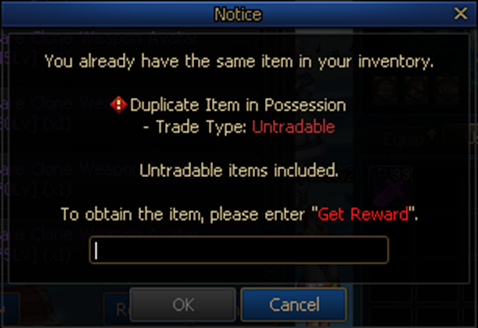
- Added the following pop-up confirmation window for selecting equipment and Avatars for a class different from the currently logged-in character.
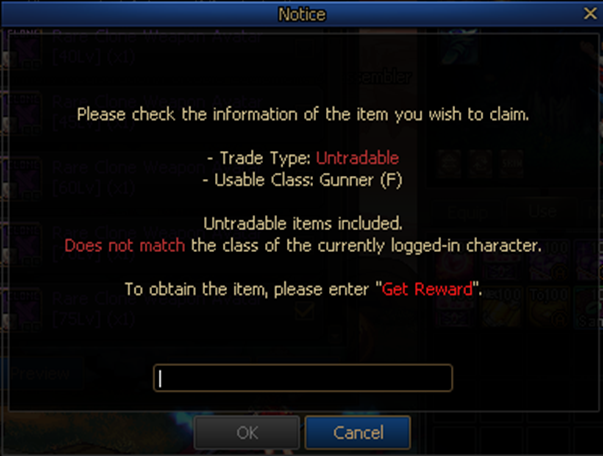
- Changed the content of the pop-up alert window that appears when Untradable items have appeared from a reward box.
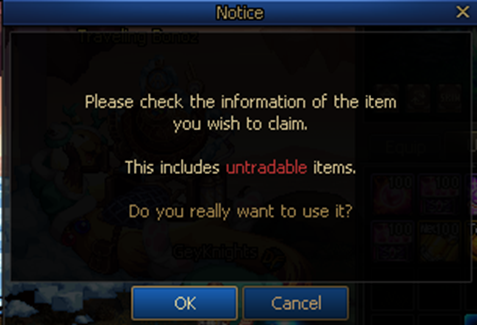
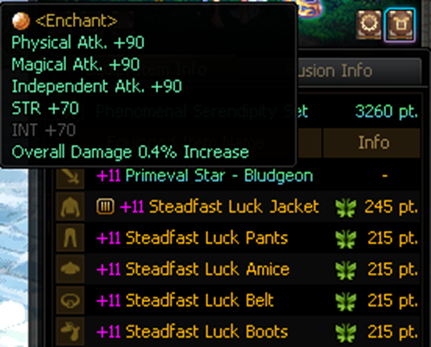
Inventory: Equipped Item Information Visibility Improvements
- Added a tooltip and slot highlight to part icons for when you mouse over them.
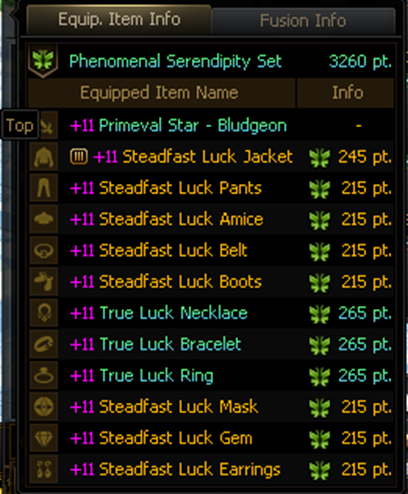
- If an equipped equipment item has a long name, you can see the full item name in a tooltip that appears on mouseover.
Other
- Added the ability to prioritize the order of consumption of same type items in quick slots based on Level requirements.
- Character Creation: Improved text box focusing in the case of duplicate character names so that you can correct the character name quickly.
- Increased the maximum number of items craftable per Profession from 100 to 500.
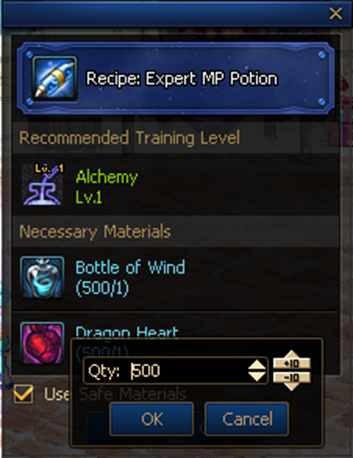
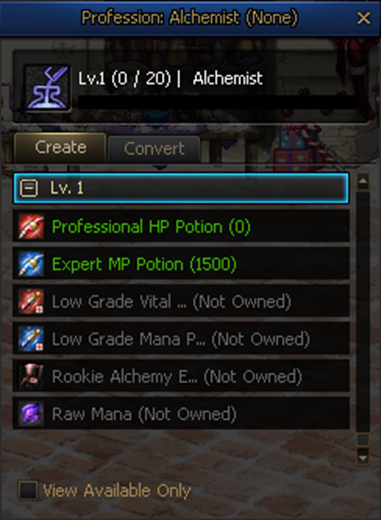
- Profession Recipe List: Changed to display the maximum number of items craftable based on the number of items you currently have.
- Removed the carrying limit on some items.
|
Item Name
|
Current Carrying Limit
|
New Carrying Limit
|
|
Enchantment Shop Puppet
|
1,000
|
Unlimited
|
|
Disassembly Shop Puppet
|
1,000
|
Unlimited
|
|
Soldoros
|
1,000
|
Unlimited
|
|
Natalia
|
1,000
|
Unlimited
|
|
Sandstorm Varracht
|
1,000
|
Unlimited
|
|
Biyan
|
1,000
|
Unlimited
|
|
Repair Potion
|
1,000
|
Unlimited
|
|
Stamina Recovery Potion
|
1,000
|
Unlimited
|
|
Strange Vaccine
|
1,000
|
Unlimited
|
|
Strange Powerful Vaccine
|
1,000
|
Unlimited
|
Portal Improvements
The locations and interaction ranges of warp gates in the Sunken Depths towns and dungeons will be adjusted.
- Inae, City of Promise
- Crimson Mine Village
- (Advanced Dungeon) Temple of Death Lobby
- (Advanced Dungeon) Temple of Death Dungeon
- (Advanced Dungeon) Azure Main Lobby
- (Advanced Dungeon) Azure Main Dungeon
- (Advanced Dungeon) Moon-Submerged Lake Lobby
- (Special Dungeon) Bleeding Mines Lobby
- (Legion) Venus, Goddess of Beauty Lobby
Content Observer System
The Content Observer system will be applied first to the Venus Legion and Unshackled Nightmare(Challenge) and will only be available for Solo mode.

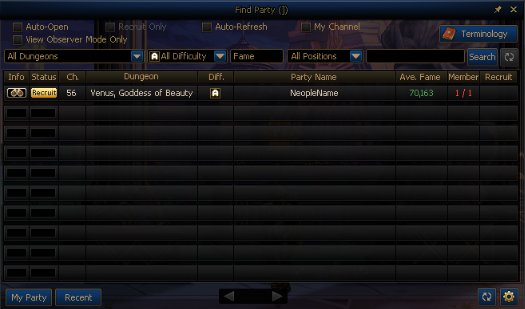
* The View Observable Parties Only option will be added to the [Venus, Goddess of Beauty] Find Party pop-up window.
- You can enable this option to see only the parties that can be observed at the moment.
How to Use the Observer System
The Observer system is divided into the broadcaster, who provides the stream, and the observer, who watches it.
Stream Broadcasting
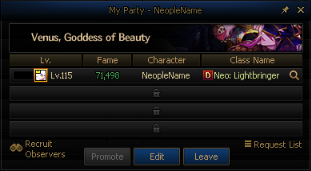
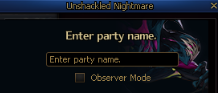
* You can enable the Observer feature when creating a party, which will set the party type to a single-player party.
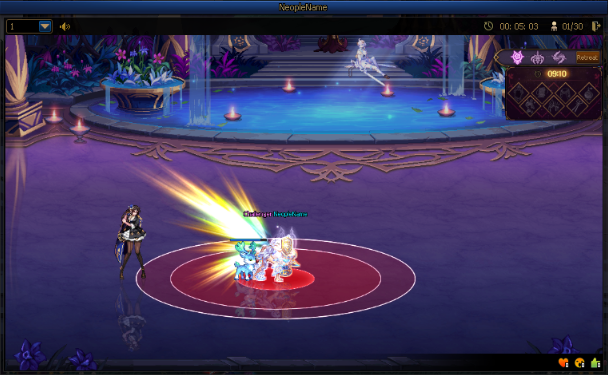
* The stream will start broadcasting from the moment the party is registered, and your UI information will be obscured.
Stream Watching
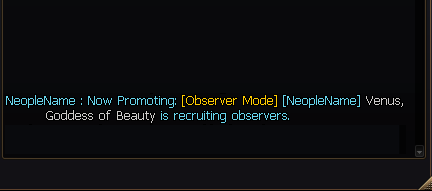
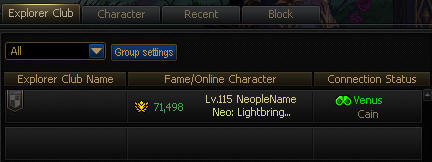
* You can watch streams using the following methods.
* You can only watch 1 stream at a time.
| How to Enter |
Channel Type |
Image |
| Find Party Pop-up window |
Only accessible when in the Venus or Unshackled Nightmare(Challenge) channel
|
|
| Chat Window Promotion Tab Hyperlink |
|
| Community - Explorer Club Friends Tooltip |
Available regardless of channel
|
|
* The default size of the Observer screen will be automatically adjusted according to the aspect ratio of the broadcaster and the resolution of the observer.
- Supports scaling from a minimum of 0.5x to a maximum of 1.5x.
* The number of people who can enter the broadcaster's stream is limited to a maximum of 30, and the information will be provided separately on the Observer screen.
System Termination
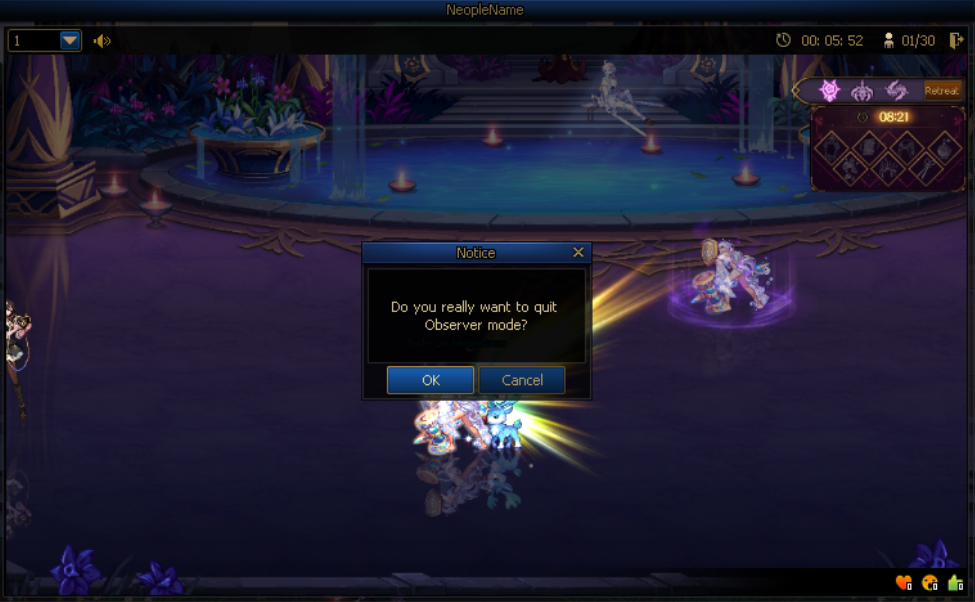
* If the broadcaster disbands the party or disables the Observer Mode option by editing the Party information, the Observer mode will be terminated.
* Observers can exit the Observer mode with the Exit button on the right side of the Observer UI.
- Observer mode will be automatically terminated when the channel or character is changed, the game is ended, or the Content Auction Search is completed.
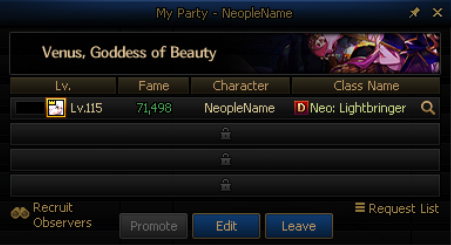
Recruit Observers
* You can use the My Party - Recruit Observers button to encourage others to watch your stream by entering a chat message in the Recuit tab.
Character Deletion – Checklist Notification System
A Checklist Notification Window will now appear when you attempt to delete a character.
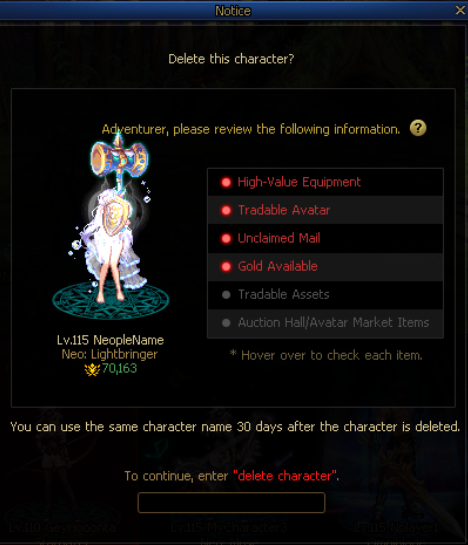
The criteria for each checklist item are as follows.
|
High-value item equipment
|
If the character has high-value equipment (e.g., +12 Reinforcement, +10 Amplification, +8 Refinement, or enchantments at 196 Fame or higher)
|
|
Tradable Avatar
|
If the character has Tradable Rare Avatars
|
|
Unclaimed Mail
|
If the character has unclaimed mail
|
|
Gold Owned
|
If the character has at least 1 million Gold
|
|
Tradable Assets
|
If the character has Tradable items worth over 1 million Gold (e.g., Souls, Enchantment Cards) that have either an Auction Hall average price or a shop sale value.
* Only Rare or higher rarities will be counted.
|
|
Auction Hall/Avatar Market-Registered Items
|
If the character has an Avatar or item listed in the Auction Hall or Avatar Market
|
Additional Changes
Unshackled Nightmare (Challenge)
- Changed the "Zenith" achievement obtainment timing to when the Monthly reward is obtained.
- Changed the timing of "Pierce" for some of Sarpoza's patterns.
- Eased attack timing for some of Sarpoza's patterns.
- Eased the attack range of some of Sarpoza's patterns.
- Changed the way that Monthly rewards are issued so that they can now be received through the HUD.
Unshackled Nightmare
- Zermio the Assailant's Cheshire pattern will no longer allow you to step on Cheshire's Rats during Invincibility.
Added “Cannot be used on equipment that cannot be transcended.” text to Transcendent Stone tooltip.
Changed the requirements to obtain the Title Book – Lucky Break Title.
- Receive 50 or more Colored Cube Fragments from equipment disassembly 100 times. → Receive Low Grade Elemental Crystals from equipment disassembly 100 times.
Revised Set Fusion Stone upgrade confirmation text while removing Fusion Stone Upgrade Distinct Fusion Stone upgrade confirmation feature.
Removed Doom Oracles from the Asrahan: Mu, God of Mist raid rewards.
Added new items to the “Forged God Nabel” Raid Shop.
|
Item Name
|
Description
|
Sale Price
|
Trade Type
|
Purchase Limit
|
|
 Ignorant Might Remnant Box (1) Ignorant Might Remnant Box (1)
|
Contains 1 Ignorant Might Remnant.
|
Ignorant Might Remnant x2
|
Account-bound
|
100 times weekly per account
|
[Monster Collection] The Machine Revolution Weapon & Armor Fusion Stone Selection Box: Added Chimera and Paramedic options.
Brawler (F): Adjusted the speed of the Junk Spin skill process in the Arena.
Improved the ability to register "Otherversal Energy" equipment in the Armory and disassemble it in the Portable Equipment Dismantler NPC.
Improved "Otherversal Energy equipment" to be disassembled by the Disassembler profession at Level 1.
Equipment Promotion: Improved the notification window so that you must enter the word, "promote" before proceeding.
Bleeding Mines: Improved the notification window to show uncleared dungeons upon receiving rewards.
Skin Storage: Added a random 2nd Awakening cutscene feature.
Lv. 115 Advancement Change Scroll: Expanded the Complete All Epic Quests requirement to include the Inae Dusk War scenario.
Unified notation for traveling between towns and maps in the in-game mini-map.
- Added name tags for travel between towns and docks.
- The name tag is removed while you are simply moving within the town map.
- Unified dotted and solid line notation within the mini-map.
Mechanic (M): Upon learning Type: Alpha SW, the character will no longer track enemies whose target information signals are either Invincible or Unattackable.
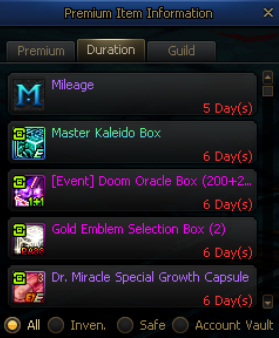
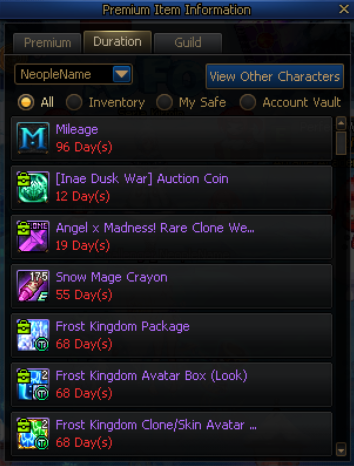
Temporary Item Information Improvements
|
Before
|
After
|
|
|
|
The Temporary Item Info window size will be increased.
With the increased window size, the layout of information such as duration details in the Premium tab will be adjusted accordingly.
Item
- You can now view temporary items held by characters that are not currently logged in.
How to Access
* Select the dropdown menu at the top of the Item tab.
* Select the "View Other Characters" button.
- Items stored in the Account Vault will be displayed as belonging to the currently logged-in character.
- When viewing other characters:
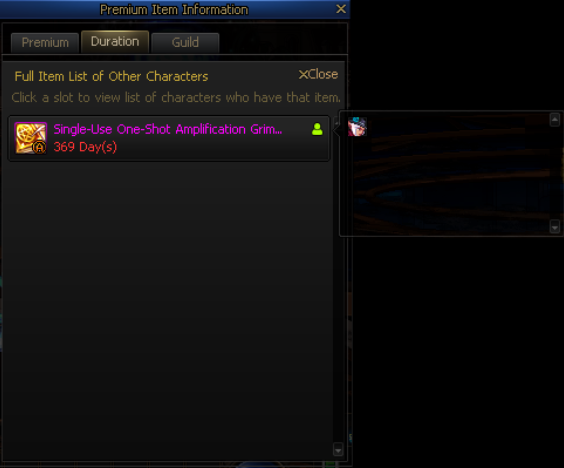
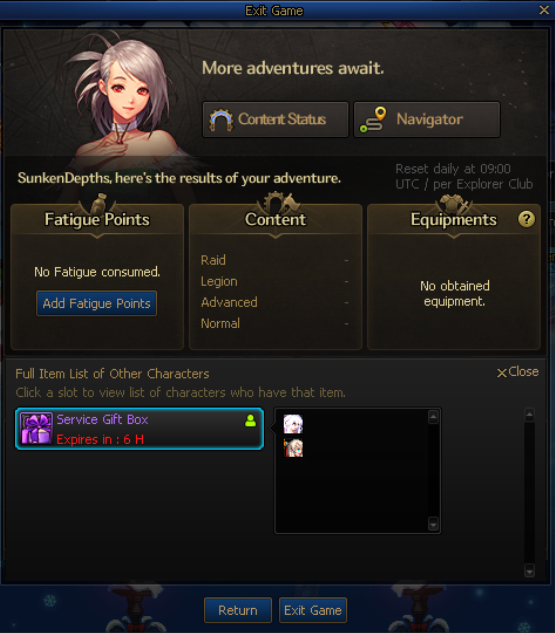
* You can check which characters hold each item as well as the quantity via the character icon.
* Selecting a character name will switch to that character.
* The Temporary Item Info window will remain open upon switching characters.
Changes to the View Other Characters function will also apply to the Temporary Item Info section at the bottom of the Exit Game screen.
 Edge
Click the "View Site Information" icon on the left side of the address bar,
Edge
Click the "View Site Information" icon on the left side of the address bar, Firefox
Select "Allow" in the notification window that appears
Firefox
Select "Allow" in the notification window that appears Other browsers
Allow blocked notifications in your browser’s settings.
Other browsers
Allow blocked notifications in your browser’s settings.
.jpg)


.jpg)
.jpg)
.jpg)
.jpg)
.jpg)
.jpg)
.jpg)
.jpg)
.jpg)
.jpg)
.jpg)
.jpg)
.jpg)
.jpg)
.jpg)
.jpg)
.jpg)
.jpg)
.jpg)
.jpg)
.jpg)
.jpg)
.jpg)
.jpg)
.jpg)
.jpg)
.jpg)
.jpg)

.jpg)
.jpg)
.jpg)
.jpg)
.jpg)

.jpg)


.jpg)

.jpg)


.jpg)


.jpg)