Mist Assimilation
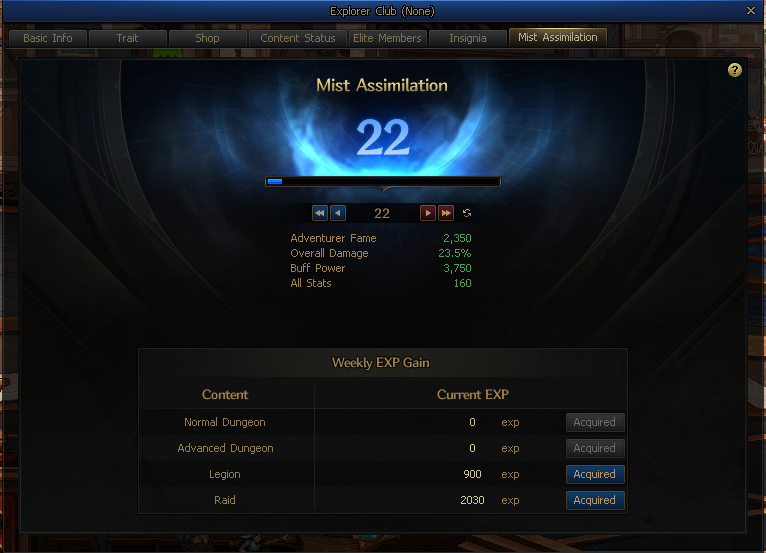
The Mist Assimilation system will be implemented.
- The Side Story quest, [Mist Assimilation] Seeped Mist, will be added.
Play the Sunken Depths content with a character at Level 115 or above to gain Mist Assimilation EXP. The amount of EXP gained varies, depending on the content.
|
Category
|
Dungeons
|
Difficulty
|
EXP Gain
|
|
Normal Dungeon
|
Sunken Depths Normal Dungeons (6 Kinds)
|
Normal
|
2
|
|
Expert
|
4
|
|
Master
|
6
|
|
King
|
8
|
|
Slayer
|
10
|
|
Gaze of the Maleficents (6 Kinds)
|
-
|
30
|
|
Disciple of Doom
|
-
|
20
|
|
Abyss: Disciple of Doom
|
-
|
150
|
|
Verge of Doom
|
Unique
|
85
|
|
Legendary
|
350
|
|
Epic
|
750
|
|
Track the Malefic Energy
|
-
|
1
|
|
Annihilate the Maleficents
|
-
|
2
|
|
Advanced Dungeon
|
White Cloud Valley of Dreams
|
-
|
200
|
|
Solidaris of Dreams
|
-
|
300
|
|
Moon-Submerged Lake
|
-
|
500
|
|
Azure Main
|
-
|
610
|
|
Temple of Death
|
-
|
680
|
|
Unshackled Nightmare
|
-
|
810
|
|
Legion
|
Venus, Goddess of Beauty
|
Level 1/Matching
|
600
|
|
Level 2
|
900
|
|
Advent
|
900
|
|
Raid
|
Nabel: Barrier of Nonvolition
|
Solo/Matching
|
600
|
|
Nabel: Evil of Ignorance
|
Normal/Hard
|
1,020
|
|
Delezie: First Act
|
Solo/Matching
|
1,180
|
|
Inae Dusk War
|
-
|
1,530
|
|
Delezie: Last Act
|
-
|
2,030
|
EXP is shared among all characters in the Explorer Club. Once you have earned enough EXP, your Mist Assimilation stage will increase.
When the amount of EXP you've gained during a week exceeds a certain limit, a penalty will be applied to any surplus amounts.
- The penalty application limit varies, depending on the content group. If you earn more than the limit, the penalty for the next EXP bracket will be applied to the excess EXP.
- The penalty will be reset on Tuesday at 09:00 UTC.
|
Category
|
Weekly EXP Gain Limit
|
Penalty
|
|
Normal Dungeon
|
Up to 22,360
|
X
|
|
22,361 - 27,450
|
-50%
|
|
27,451 - 29,485
|
-80%
|
|
29,486 or above
|
-99%
|
|
Advanced Dungeon
|
Up to 16,280
|
X
|
|
16,281 - 18,345
|
-80%
|
|
18,346 or above
|
-99%
|
|
Legion
|
Up to 10,800
|
X
|
|
10,801 - 12,240
|
-80%
|
|
12,241 or above
|
-99%
|
|
Raid
|
Up to 48,840
|
X
|
|
48,841 - 53,720
|
-80%
|
|
53,721 or above
|
-99%
|
Mist Assimilation Effect
Removes the Liberate Engraved Memories system and its functions from the related NPCs and their menus.
- The Engraved Memory of the Sunbeam option, which was previously applied at +3 Tuning, will now be applied as a Mist Assimilation Stage 1 option by default.
|
Overall Damage
|
Buff Power
|
Adventurer Fame
|
|
10%
|
2,400
|
1,000
|
- Existing weapons with Liberate Engraved Memories applied to them can no longer be equipped. Attempting to equip them, or logging in with a character that has them equipped, will instantly grant you 400 Ignorant Might Remnants.
* The Fame value displayed on your character may be different from the actual value when you log in for the first time after this update.
Each time your Mist Assimilation stage increases, the following are applied to all Level 115 characters in the Explorer Club.
|
Overall Damage
|
Buff Power
|
Adventurer Fame
|
|
0.5%
|
50
|
50
|
The following are additionally applied when Mist Assimilation reaches a certain stage.
|
Additional Effect
|
Overall Damage
|
Buff Power
|
Adventurer Fame
|
All Stats
|
|
Upon reaching Stage 5/15/25
|
0.5%
|
50
|
50
|
30
|
|
Upon reaching Stage 10/20
|
1%
|
100
|
100
|
50
|
|
Upon reaching Stage 30
|
2%
|
200
|
200
|
60
|
Will of Transcendence Improved
Loot Shop
The following new products will be added to the Will of Transcendence Loot Shop.
|
Sale Item
|
Description
|
Purchase Limit
|
Trade Type
|
Selling Price
|
|
 Void Soul (1) (Will of Transcendence) Void Soul (1) (Will of Transcendence)
|
Contains 1 Void Soul.
|
20 per account weekly
|
Account-bound
|
Will of Transcendence x50
|
|
 Venus/Nabel Distinct Fusion Stone Conversion Scroll Selection Box Venus/Nabel Distinct Fusion Stone Conversion Scroll Selection Box
|
Contains a Venus/Nabel Distinct Fusion Stone Conversion Scroll of your choice.
[Available Item Info]
Venus Distinct Fusion Stone Conversion Scroll - Betrayal
Venus Distinct Fusion Stone Conversion Scroll - Desire
Venus Distinct Fusion Stone Conversion Scroll - Elegance
Nabel Distinct Fusion Stone Conversion Scroll - Blessing
Nabel Distinct Fusion Stone Conversion Scroll - Teana
Nabel Distinct Fusion Stone Conversion Scroll - Creation
Nabel Distinct Fusion Stone Conversion Scroll - Ignorance
Nabel Distinct Fusion Stone Conversion Scroll - Design --
Nabel Distinct Fusion Stone Conversion Scroll - Design 35
Nabel Distinct Fusion Stone Conversion Scroll - Design 40
Nabel Distinct Fusion Stone Conversion Scroll - Design 45
Nabel Distinct Fusion Stone Conversion Scroll - Design 60
Nabel Distinct Fusion Stone Conversion Scroll - Design 70
Nabel Distinct Fusion Stone Conversion Scroll - Design 75
Nabel Distinct Fusion Stone Conversion Scroll - Design 80
|
1 per account monthly
|
Account-bound
|
Will of Transcendence x2,000
|
|
 Epic Set Equipment Conversion Scroll Epic Set Equipment Conversion Scroll
|
Converts material equipment into an item of a different kind of the same set, at equal rates.
[Required Materials]
Epic Set equipment x1
Epic Soul x2
Malefic Residue x800
[Resulting Equipment]
Set Epic equipment of any part of the same set x1
Reinforced/Amplified/enchanted/Tuned/fused equipment and Black Fang equipment cannot be converted.
|
1 per account monthly
|
Account-bound
|
Will of Transcendence x800
|
|
 Advanced Dungeon Distinct Equipment Legendary Promotion Scroll Advanced Dungeon Distinct Equipment Legendary Promotion Scroll
|
Used to promote Unique Advanced Dungeon Distinct equipment to Legendary Advanced Dungeon Distinct equipment of the same part.
[Required Materials]
Unique Advanced Dungeon Distinct equipment x1
Legendary Soul x40
Malefic Residue x340
[Resulting Equipment]
Legendary Advanced Dungeon Distinct equipment of the same part x1
|
2 per account monthly
|
Account-bound
|
Will of Transcendence x200
|
Crafter
New obtainable items will be added to the Crafter.
|
Item Name
|
Description
|
Trade Type
|
|
 [Black Fang Primeval Conversion Scroll] Convertor [Black Fang Primeval Conversion Scroll] Convertor
|
Converts a material [Black Fang Primeval Conversion Scroll] into a [Black Fang Primeval Conversion Scroll] of a different kind at equal rates.
[Required Materials]
[Black Fang Primeval Conversion Scroll] x1
3,000,000 Gold
[Result]
Account-Bound [Black Fang Primeval Conversion Scroll] x1
|
Account-bound
|
Following the addition of new finished products to the Crafter, the probability rates of certain existing items will be adjusted.
- Soul Denaturant
- Brilliant Doom Doorplate
- Abyssal Doom Oracle Box (1) x20
- Riven Silk of Praise x100
- Malefic Residue x50
- The probability rates of the other items will remain the same.
Real-time Battle Broadcasting
The [6th Apostle, Delezie of Plague Raid] will now feature live battle broadcasting.
- This feature will allow you to briefly broadcast your battle status to other Raid Group members during the Raid, based on the progress of certain monsters.
- During the activation of this feature, the In-Raid Observer function inside the Raid will be closed and temporarily disabled.
- As with Observer mode, you can close this feature by holding down the End key (the default hotkey).
In-Raid Observer System
Developer Comment: We've introduced the In-Raid Observer system to help you quickly see what other Raid Group members are doing in the Raid content, giving you more flexibility in your play and builds.
In-Raid Observer can be used regardless of your current combat situation.
We hope this will help keep the flow of content uninterrupted and keep the tension high until the end.
In-Raid Observer will only be available for the [6th Apostle, Delezie of Plague] Raid.
How to Use In-Raid Observer
In-Raid Observer can be used regardless of your current combat situation.
It can't be used during real-time battle broadcasting.
How to Enter Observer Mode
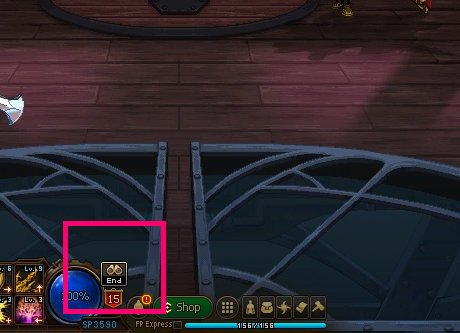
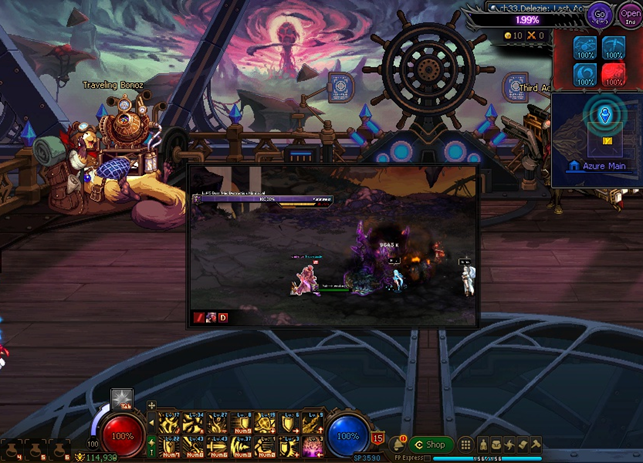
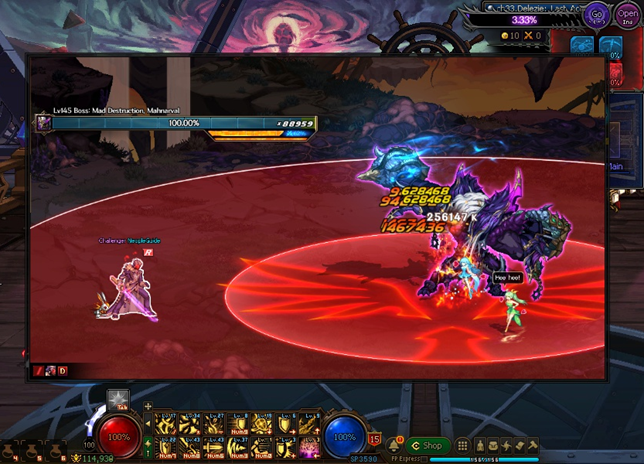
Upon starting the [6th Apostle, Delezie of Plague Raid], the Enter In-Raid Observer button will appear on the screen.
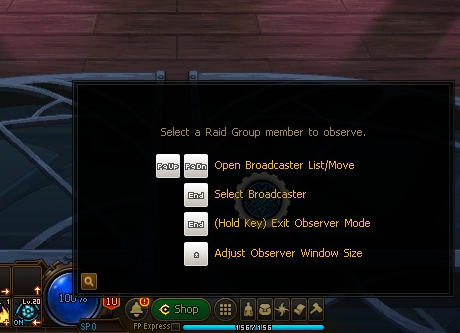
Click the Enter Observer button or press the hotkey to open the Observer window.
- The Observer keyboard controls screen will appear before you select the broadcaster.
|
Enter Observer Button
|
Observer Window
|
|
|
|
Observer Controls
You can control with the keyboard and mouse.
- Use the mouse to relocate the Observer window.
The End key will be registered as the default hotkey.
- It won't be registered if it's set to a different function.
- You can change it in Hotkey Settings.
Bring the cursor over the Observer window to view the dedicated HUD at the top and the bottom.
The dedicated HUD will provide the following functions.
|
Category
|
Details
|
Keyboard Key
|
Image
|
|
Resize
|
You can resize the Observer window.
Three different sizes are supported.
50%
100%
150%
|
*
|
|
|
Sound
|
You can turn the broadcaster's sound on or off.
|
|
|
Opacity
|
You can adjust the opacity of the Observer window.
|
|
|
Exit Observer
|
You can exit Observer mode.
|
Hold down End (default hotkey)
|
|
Open Broadcaster List
|
You can open the Broadcaster List.
|
Enter PgUp or PgDn
|
|
Select Broadcaster
|
In the Broadcaster List, you can select a user and watch their screen.
Characters in a different party from you will appear in the Broadcaster List.
Characters that can't be observed will appear disabled in the list.
|
Enter End (while Broadcaster List is opened)
|
Exit Observer
Your observation will end at the end of the content.
You can exit Observer mode by clicking the Exit Observer UI or entering the hotkey.
 Edge
Click the "View Site Information" icon on the left side of the address bar,
Edge
Click the "View Site Information" icon on the left side of the address bar, Firefox
Select "Allow" in the notification window that appears
Firefox
Select "Allow" in the notification window that appears Other browsers
Allow blocked notifications in your browser’s settings.
Other browsers
Allow blocked notifications in your browser’s settings.
.jpg)


.jpg)
.jpg)
.jpg)
.jpg)
.jpg)
.jpg)
.jpg)
.jpg)
.jpg)
.jpg)
.jpg)
.jpg)
.jpg)
.jpg)
.jpg)
.jpg)
.jpg)
.jpg)
.jpg)
.jpg)
.jpg)
.jpg)
.jpg)
.jpg)
.jpg)
.jpg)
.jpg)

.jpg)
.jpg)
.jpg)
.jpg)
.jpg)

.jpg)


.jpg)

.jpg)


.jpg)


.jpg)