Sky of a Thousand Seas Quality of Life Improvements
Inventory Account Material Slot Expansion
New materials will be added to the Account Material slots in the inventory.
- Dim Soul
- Splendor Soul
Pilgrimage Seal (Formerly Malefic Residue)/Gold Conversion Function Expanded
Transcendence
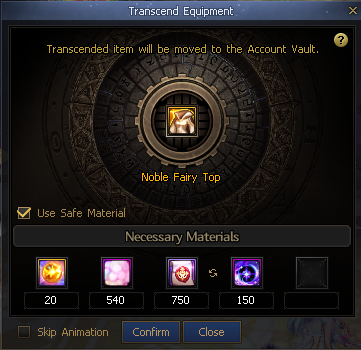
For Lv. 115 equipment transcendence, you can replace the required Pilgrimage Seals with Gold to proceed with transcendence.
The required amounts of Souls, higher-grade elemental crystals, and Void Souls for each rarity will remain the same.
|
Equipment Type
|
Category
|
Pilgrimage Seal or Gold
|
Reference Image
|
|
Weapon
|
Rare
|
x20 or 100,000 Gold
|
|
|
Unique
|
x38 or 190,000 Gold
|
|
Legendary
|
x375 or 1,875,000 Gold
|
|
Epic
|
x1,125 or 5,625,000 Gold
|
|
Primeval
|
x4,500 or 22,500,000 Gold
|
|
Armor
Accessory
Special Equipment
|
Rare
|
x13 or 65,000 Gold
|
|
Unique
|
x25 or 125,000 Gold
|
|
Legendary
|
x250 or 1,250,000 Gold
|
|
Epic
|
x750 or 3,750,000 Gold
|
|
Primeval
(Armor/Special Equipment Excluded)
|
x3,000 or 15,000,000 Gold
|
Conversion/Promotion Scroll Items
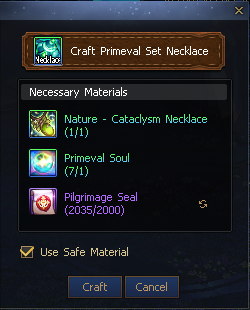
When using the following items, you can replace the required Pilgrimage Seals with Gold.
- Primeval Set Accessory Same Part Conversion Scroll
- Primeval Set Accessory All Part Conversion Scroll
- Epic Set Equipment Conversion Scroll
- Advanced Dungeon Distinct Equipment Legendary Promotion Scroll
- Advanced Dungeon Distinct Equipment Epic Promotion Scroll
The required amounts of other materials will remain the same.
|
Item Name
|
Pilgrimage Seal or Gold
|
Reference Image
|
|
Primeval Set Accessory Same Part Conversion Scroll
|
x2,000 or 10,000,000 Gold
|
|
|
Primeval Set Accessory All Part Conversion Scroll
|
x1,000 or 5,000,000 Gold
|
|
Epic Set Equipment Conversion Scroll
|
x800 or 4,000,000 Gold
|
|
Advanced Dungeon Distinct Equipment Legendary Promotion Scroll
|
x340 or 1,700,000 Gold
|
|
Advanced Dungeon Distinct Equipment Epic Promotion Scroll
|
x860 or 4,300,000 Gold
|
Enchantment Upgrade Improvements
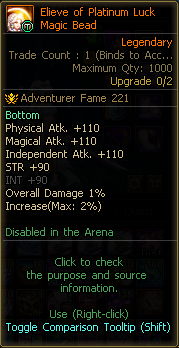
Upgrade values will now be displayed even in Magic Bead form.
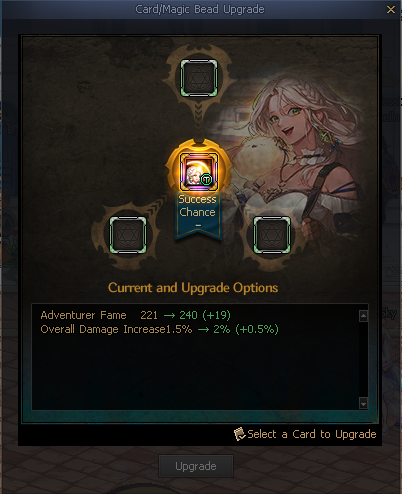
When upgrading Enchantment Cards through NPC Abello, you will also be able to upgrade them while they are in Magic Bead form.
- You can upgrade them by using Enchantment Cards as materials, and the success rates based on the number of cards will remain the same.
- Magic Beads cannot be used as upgrade materials.
- Cards cannot be upgraded if they are already applied to equipment.
After registering a Card/Bead for upgrade, it will remain registered regardless of whether the upgrade succeeds or fails.
- It will be unregistered once it reaches the max upgrade level.
|
Magic Bead Upgrade Value Display
|
Card/Magic Bead Upgrade Registration
|
|
|
|
Attribute Enchantment Improvements
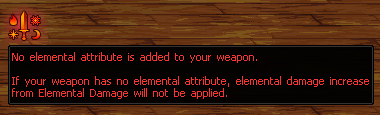
The guidance for the icon that appears when no attribute is added will be improved.
|
No Attribute Added Guidance
|
|
|
When Cube Contract is active, clicking the No Attribute Added icon will apply Cube Contract with the element with the highest Elemental Damage.
Source/Purpose Improvements
DFOpedia Source UI Improvements
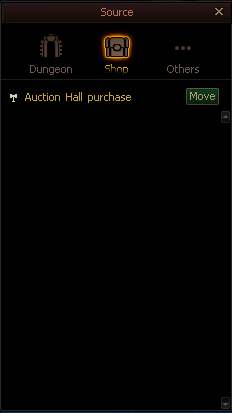
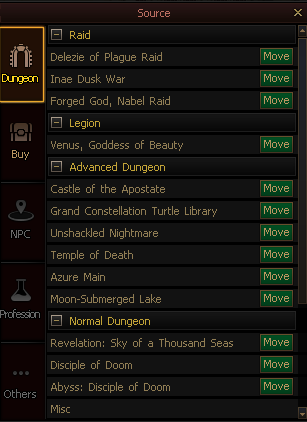
The DFOpedia Source UI will be changed.
|
Old
|
After
|
|
|
|
NPC Function and Profession categories will be added.
The NPC Info feature can also be used in the NPC Function category, just like in the Dungeon and Purchase categories.
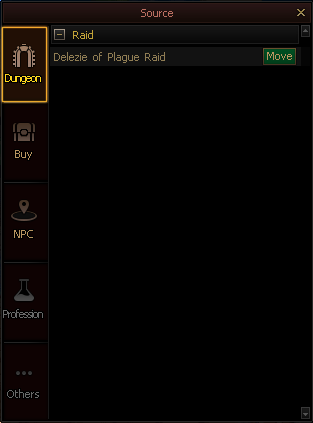
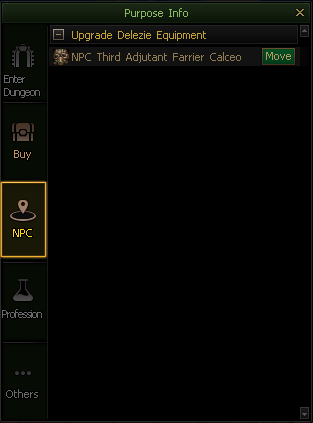
Source/Purpose Function Added
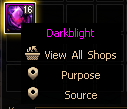
A source/purpose check feature will be added to item quick menus.
Left-click an item to check where to obtain it and where to use it.
|
Reference Image
|
|
|
|
Source
|
Purpose
|
|
|
|
Auction Hall: Buy All Function Improvements
|
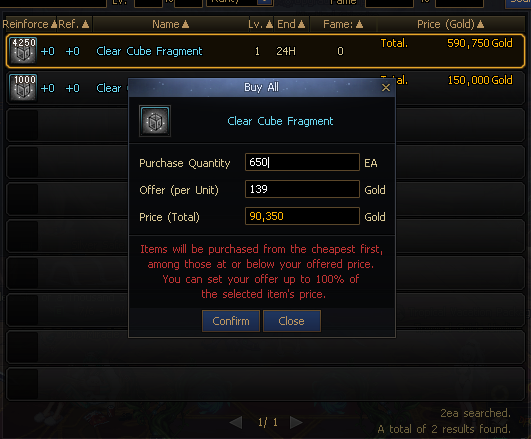
Buy All Pop-up
|
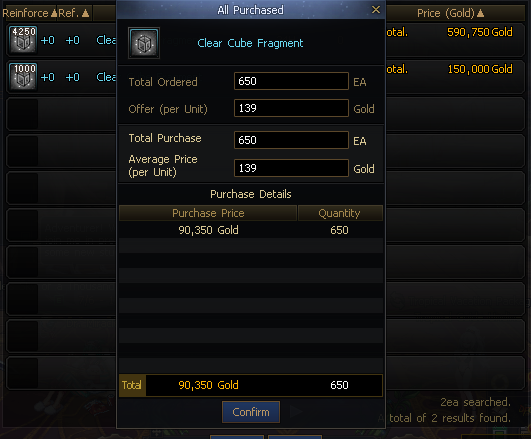
All Purchased
|
|
|
|
When using Buy All, up to 100 of the cheapest currently searched items will be purchased. (Before: 10 → 100)
After Buy All is complete, the Auction Hall list will refresh based on the purchased items.
When Buy All is complete, the average purchase price per item will be displayed after decimals are rounded down.
The Offer value can now be entered up to +100% of the currently selected item's price.
The cooldown for the Buy All feature will be changed to 5 sec.
You can now check up to 100 Auction Hall Use History entries.
The Use Vault Consumables Feature Added
You can set the Use Vault Consumables feature in the pop-up that appears when you place the cursor over the Consumable hotkey window and click the gear icon.
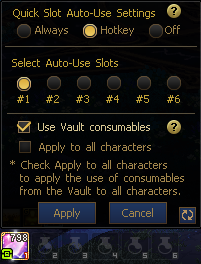
When the Use Vault Consumables feature is enabled, the application range of the consumable quick slot grouping rules will be expanded to include the Vault.
- If an item from the same consumable group as the item registered to the quick slot is in the Vault, a Vault icon mark will be displayed at the bottom left of the quick slot.
This feature applies to grouped Consumable items that can be used in dungeons.
- Items with the earliest deletion deadline will be consumed first, including items in the Vault and inventory.
- If the deletion deadline is the same, items will be consumed in the order of Untradable, Account-Bound, and Tradable.
- If all of the above conditions are the same, items will be consumed in the order of Inventory, My Safe I, My Safe II, and Account Vault.
- If all consumables in the quick slot are consumed and only items in the Vault remain, then at least 1 item will be kept in the quick slot.
Consumable Quick Slot Grouping Items Added
The following consumables will be added to the quick slot grouping items.
- Sacred Blessing
- Immortality Formula
- Vigor Elixir
- Canna's Delicious Homemade Bread
- Canna's Big Hendon Myre Milk
- Canna's Delicious Breakfast
- Canna's Homemade Bread
- Canna's Hendon Myre Milk
Items Changed to Account-bound to Improve Usability
To improve account-wide usability, the tradability of the following items will be changed to Account-bound.
- Kaleido Box
- Golden Candle
- Rare Avatar Option Change Cube
- Creature Rename Card
- Creature Food
Creature Food and Creature Name Change Tickets can now be stored in safes.
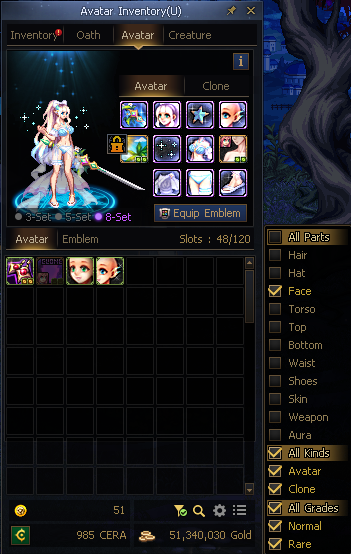
Avatar Tab Filter Feature Added
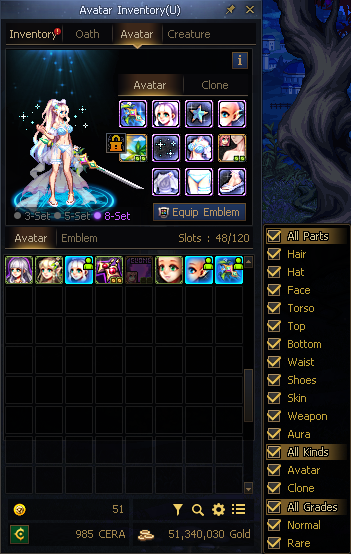
A filter feature will be added to the Avatar tab.
You can use the filter feature through the filter icon at the bottom of the Avatar tab.
When a filter is applied, you can select and view only Avatars of the desired slot, type, and grade.
When the filter feature is active, option settings, sorting, and moving avatars between slots are restricted.
※ If an Avatar slot changes while a filter is applied, it will be automatically resorted.
Creature Slot Expansion
Creature slots will be expanded to 320 slots.
Creature Inventory: Option settings, search, and sorting features will be added.
Equipment Inventory Slot Shortage Notification Added
An equipment inventory slot shortage notification and a feature that lets you open the Portable Disassembler inside dungeons will be added.
In some Special dungeons, the Inventory and Disassembler features will not be provided when you select the inventory weight/slot shortage notification.
- Bleeding Mines
Equipment Inventory Slot Shortage Notification
- Displayed when 80% or more of your Equipment Inventory slots are full.
|
Old
|
After
|
|

|
|
|
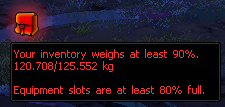
|
You can also open the Portable Disassembler by clicking this notification in dungeons.
- If you click the notification while the equipment inventory slot shortage notification is displayed, you can use the Portable Disassembler.
- If only the inventory weight notification is displayed, clicking the notification will open the inventory.
|
When Clicking the Equipment Slot Shortage Notification
|
|
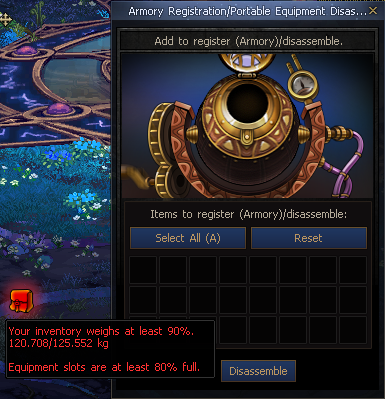
|
Hotkey Settings Button Added
The "(None)" text will be removed from the titles of system UIs that do not have a hotkey assigned.

The Hotkey Settings icon will be added to system UIs that allow hotkey settings.

 Edge
Click the "View Site Information" icon on the left side of the address bar,
Edge
Click the "View Site Information" icon on the left side of the address bar, Firefox
Select "Allow" in the notification window that appears
Firefox
Select "Allow" in the notification window that appears Other browsers
Allow blocked notifications in your browser’s settings.
Other browsers
Allow blocked notifications in your browser’s settings.
.jpg)


.jpg)
.jpg)
.jpg)
.jpg)
.jpg)
.jpg)
.jpg)
.jpg)
.jpg)
.jpg)
.jpg)
.jpg)
.jpg)
.jpg)
.jpg)
.jpg)
.jpg)
.jpg)
.jpg)
.jpg)
.jpg)
.jpg)
.jpg)
.jpg)
.jpg)
.jpg)
.jpg)
.jpg)

.jpg)
.jpg)
.jpg)
.jpg)
.jpg)

.jpg)


.jpg)

.jpg)


.jpg)


.jpg)