Upon allowing notifications, your account information will be utilized for
checking information regarding event participation when logging into your account.
Browser notification must be allowed to subscribe.
Chrome
Click the icon on the left of the browser search bar,
edit “Notifications” to be allowed, then refresh the page.
Edge
Click the "View Site Information" icon on the left side of the address bar,
then select "Allow" in the notification window that appears to receive notifications.
Firefox
Select "Allow" in the notification window that appears
on the left side of the address bar to receive notifications.
Other browsers
Allow blocked notifications in your browser’s settings.
Changed and rearranged the overall button, pop-up, and interface images.
Changed the Mini-map image inside dungeons.
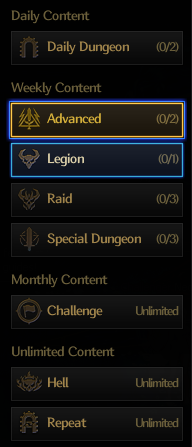
Changed the Dungeon Special Key UI.
Bottom UI Improved
Changed the shape and position of the EXP/Fatigue gauges.
Adjusted the number of buff icons displayed per row from 9 to 8.
Moved the Explorer Club icon from below the Mana gauge to the bottom-right menu.
Moved the Skill Point display position into the menu dropdown box.
- Added a notification to the bottom-right menu when a notification appears in the Skill window.
Moved the Teleport Aura UI to the upper left corner of the town mini-map.
- Changed the UI so it only appears when you equip an Aura that allows teleportation.
Battle Focus Mode
How to Set Up
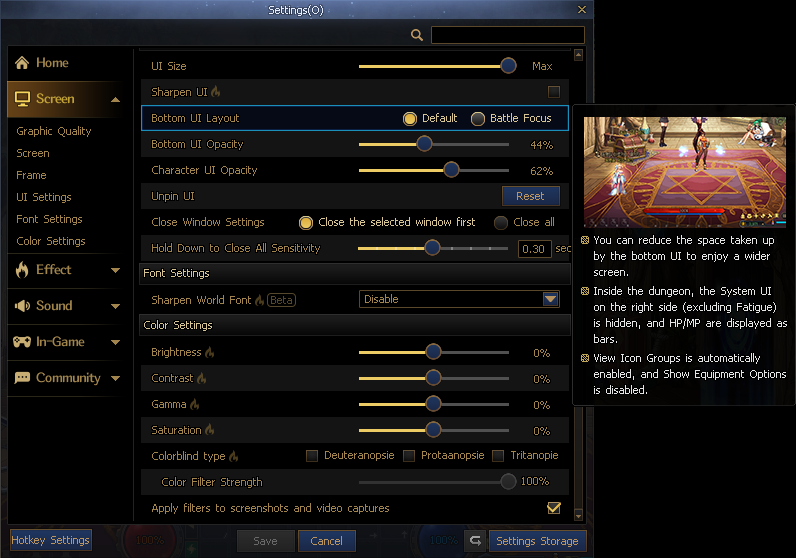
Select an option from "Settings → Screen → Bottom UI Layout."
- You can quickly move to this option through the settings controller that appears when you place the cursor over the Bottom UI.
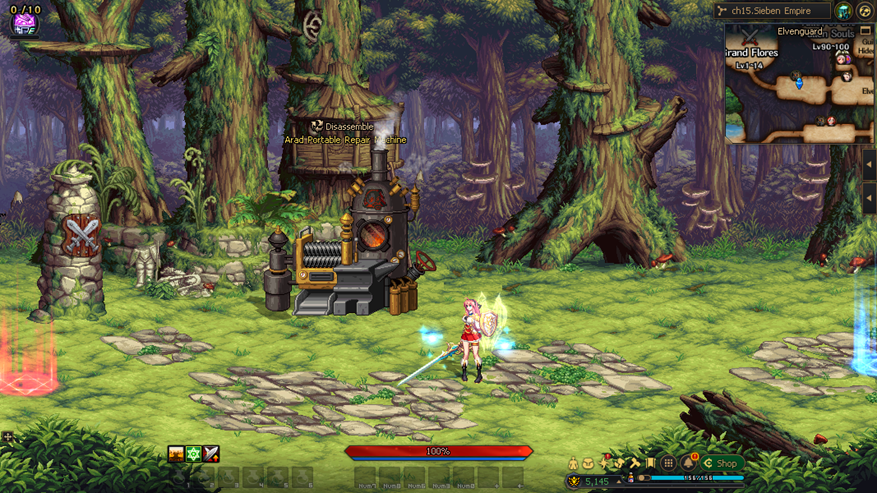
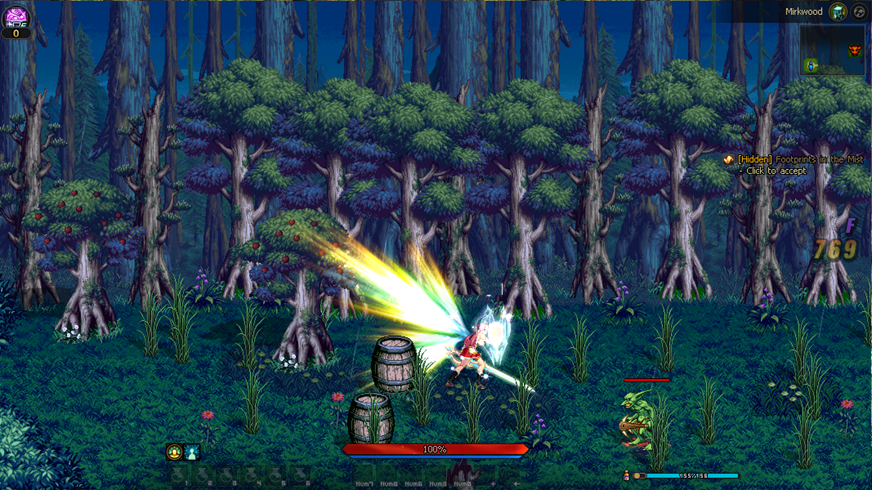
Battle Focus Mode
Town
Dungeon
Changed the HP/MP display from an orb type to a bar type.
The right-side UI will be hidden inside dungeons, except for Fatigue.
- The hidden UI is displayed when you place the cursor over the corresponding area.
If no skills are registered to the upper skill slots, the Skill window will be displayed in 1 row.
View Icon Groups will be automatically enabled, and Show Equipment Options will be disabled.
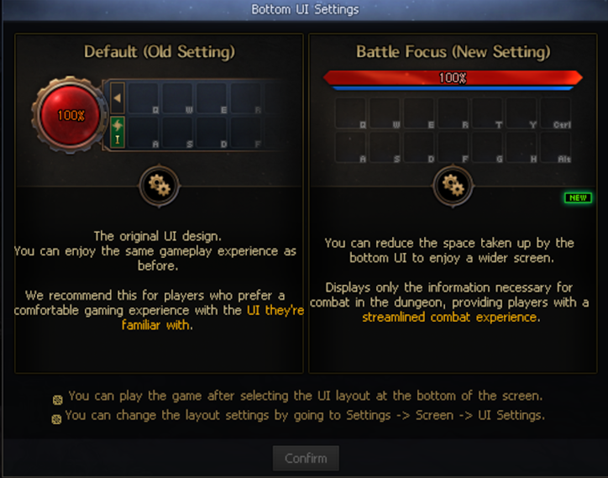
Bottom UI Settings Pop-up
When a character created after the update enters the Tutorial Dungeon, the Bottom UI settings guide pop-up will be displayed once per account.
Other Changes
Removed the Creator's "Extend Skill Slot" option.
- When you create a Creator character, skill slots will be displayed in 2 rows by default.
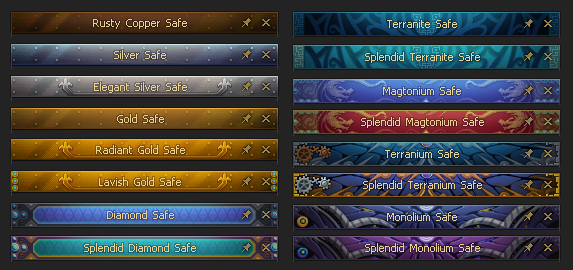
Changed the title bar images for each safe as follows to match the UI Renewal.
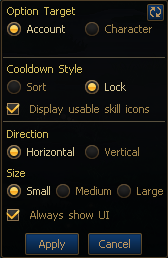
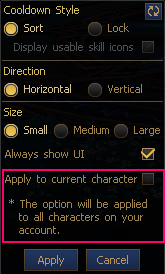
Changed the Skill Cooldown Notification by removing the "Option Target (Normal)" option and adding the "Apply to Current Character" option.
Before
After
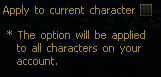
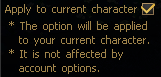
Characters with the "Apply to Current Character" option enabled will not be affected by settings changed on characters with the option disabled.
Disabled
Enabled
Improved the Bottom UI settings pop-up so a preview is displayed when you place the cursor over an option.
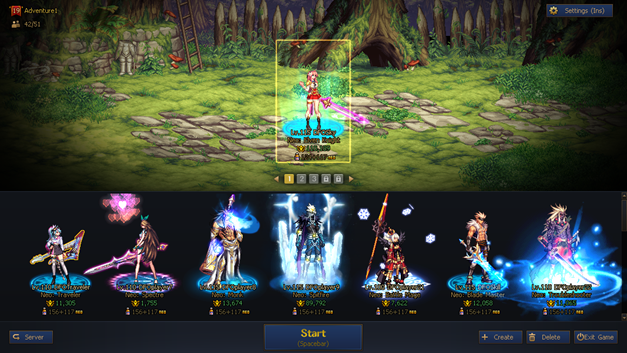
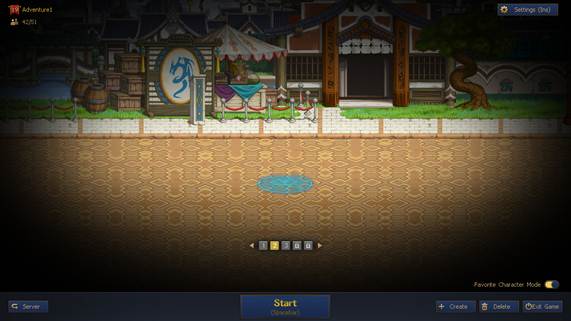
Character Selection Screen Improvements
Favorite Character Page Expansion
Favorite Character Page Expansion
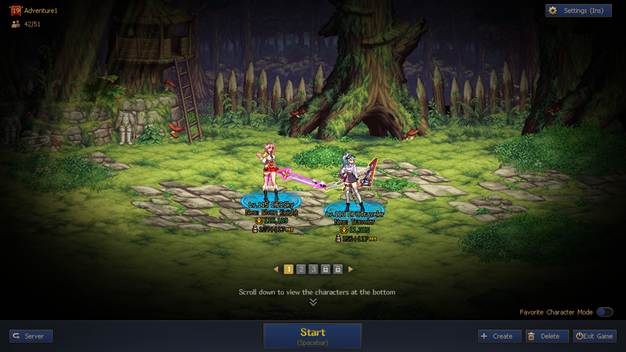
Favorite Character Mode
Expanded Favorite Character pages up to 5 pages.
- Pages will expand gradually based on the number of Character slots.
- Expanded pages are applied by server.
You can organize Favorite Characters by page to manage them for different purposes.
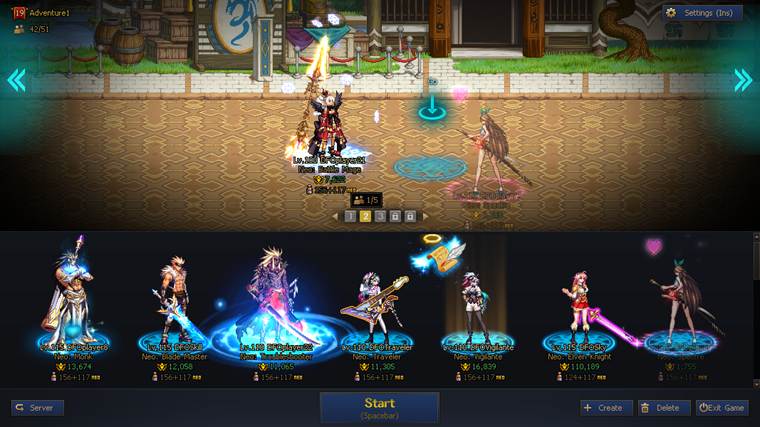
Added a dedicated mode that lets you focus on only your Favorite Characters.
- Scroll up with the mouse wheel to enter this mode.
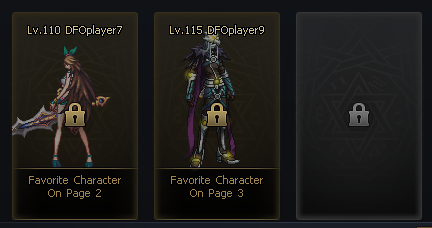
Characters placed in Favorite Characters will be displayed as follows.
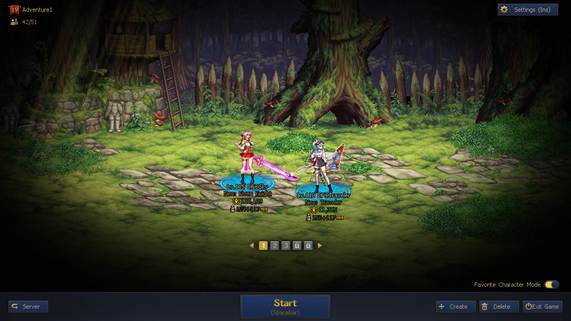
Favorite Character Mode Settings Option
When you click the Favorite Character Settings button, Favorite Character Mode will be pinned, and you can move between pages with the mouse wheel.
You can enable or disable Favorite Character Mode settings by clicking the mouse wheel button.
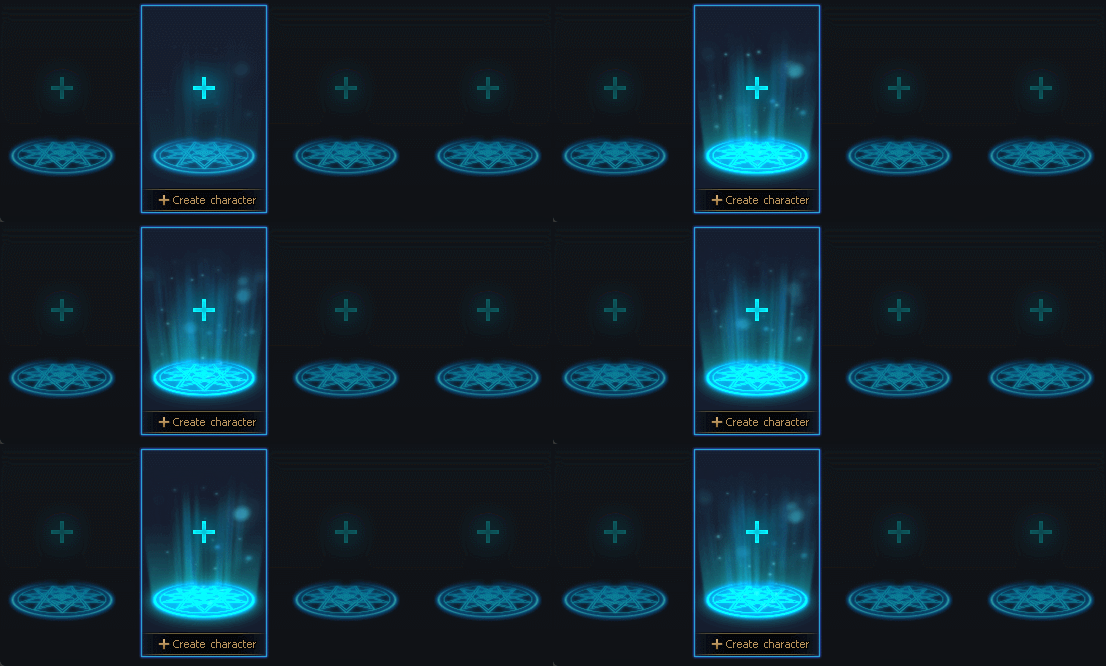
Improved New Character Creation Visibility
Added a plus sign to empty slots.
Added a lighting and glow effect upon mouseover.
Favorite Character Slot Placement
You can place 0 - 5 characters in Favorite Character slots.
Favorite Characters will be center-aligned regardless of the number of characters placed.
Character Creation Process Improvements
Improved the character creation process as follows.
Before
After
Select Class → Confirm Character Name → Character Selection Screen → Start Game
Select Class → Confirm Character Name → Start Game
Community System Improvements
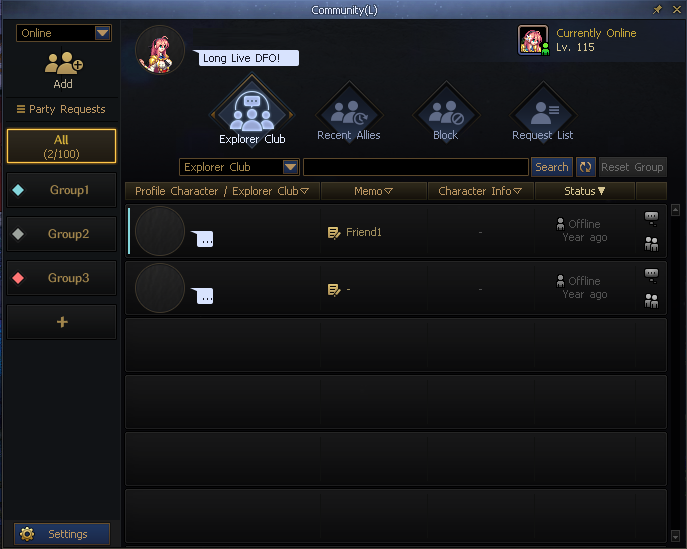
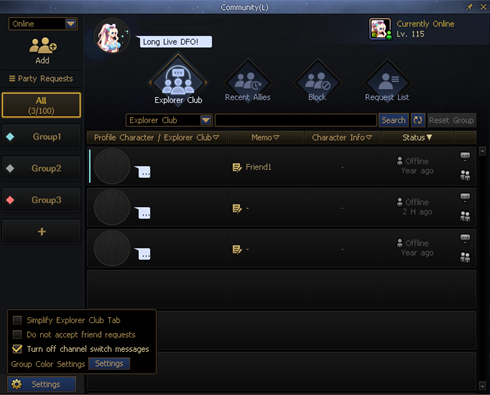
Full Community UI Renewal
Reorganized the Community window design and information layout.
Placed key features at the front to improve accessibility.
Improved the Invite to Party and Whisper features so they can be used with 1 click.
Group Management Improvements
Placed group tabs at the front of the UI window, and added the ability to change group order through drag and drop.
Added the group name edit feature. (12 English character limit)
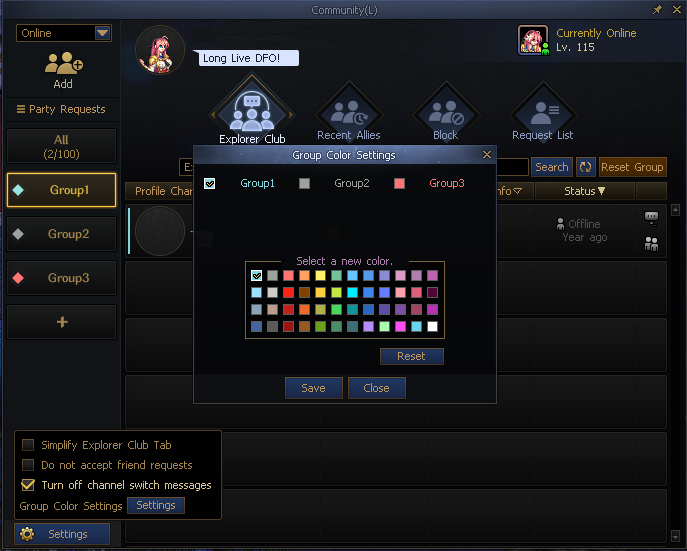
Added the ability to assign colors by group.
Added the ability to place friends in the desired group through drag and drop.
Improved the display area and UI readability to make groups easier to recognize.
My Profile Character Designation Added
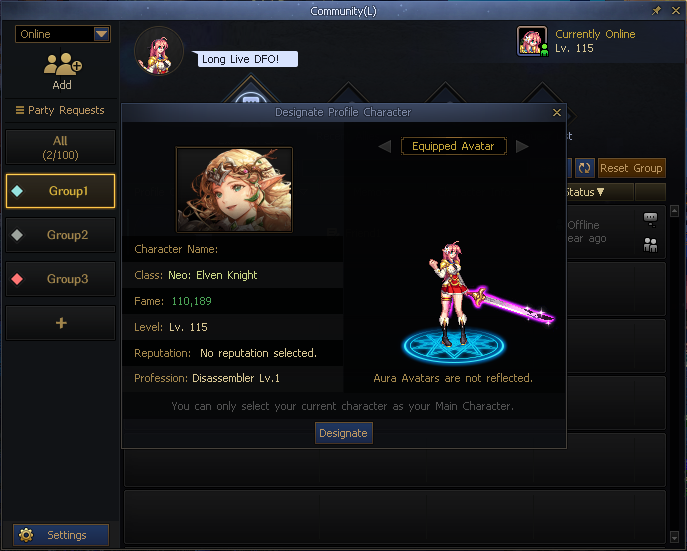
Added the ability to designate a "Profile Character" in the Community UI.
You can designate your currently connected character as your Profile Character.
When you designate a Profile Character, your Profile Character's image will be displayed in the Community window of the other Explorer Club friend.
Explorer Club Friend Profile Character Check Feature Added
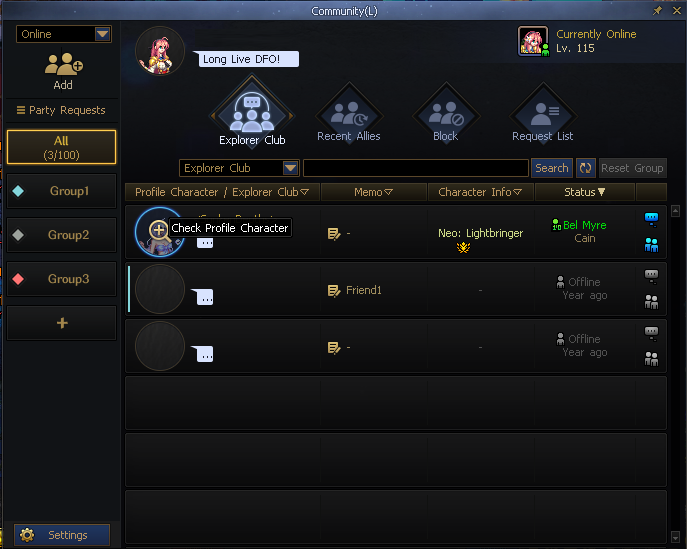
Added the ability to check a friend's Profile Character in the Explorer Club Friend list.
You can use Profile Characters to intuitively identify your friends' main playable characters.
You can use them as reference information when inviting friends to parties or communicating with them.
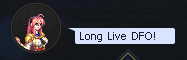
Status Message Feature Added
My Status Message Settings
My Status Message Display
Explorer Club Friend Status Message
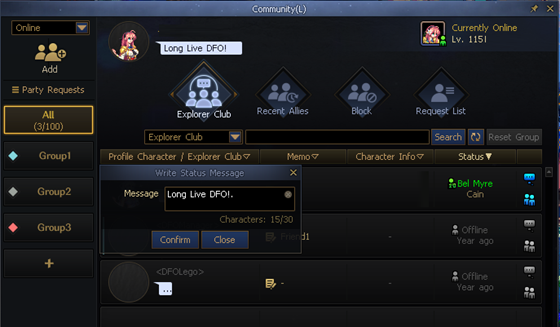
You can set a status message.
You can use status messages for various communication purposes, such as away messages or Raid Group/guild member recruitment.
You can check your friends' current statuses intuitively from the friend list.
Unconverted Friends
Existing character friends will be classified under the Unconverted Friends tab.
For Adventurers who did not have character friends, the Group tab will be displayed instead of the Unconverted Friend tab.
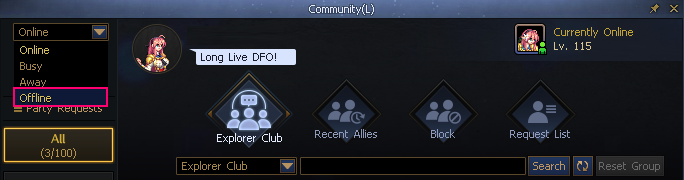
Offline Status Added
You can now select the Offline status.
The status you set will be maintained when you move to the Character Selection screen or change channels, and it will be reset when you log in to the game again after exiting.
Others
The Recent Allies list is reset every 2 weeks.
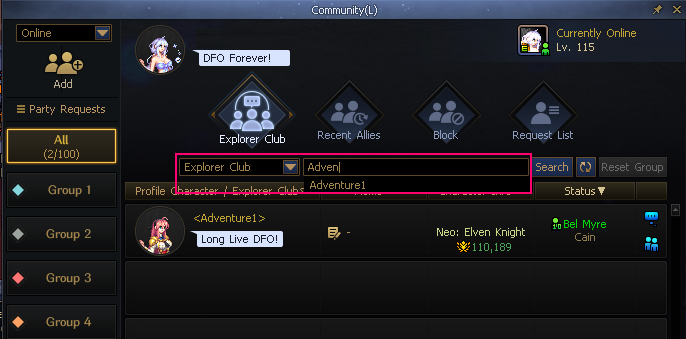
Search
Search results will be displayed in real time when you search by Explorer Club name, character name, or memo keyword.
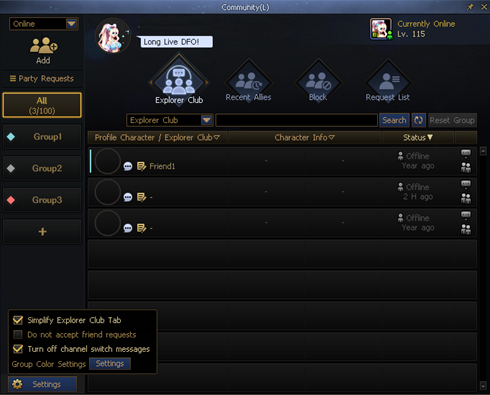
Simplified Mode
When the Simplify option is checked, up to 8 Explorer Club friends will be displayed on one screen.
Simplified Mode
Normal Mode
Avatar Equipment System Improvements
Tab Structure Renewal
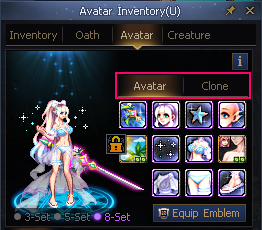
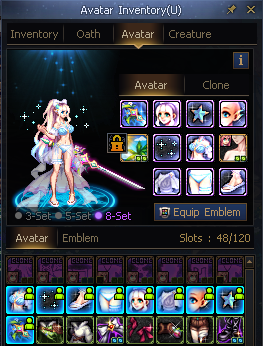
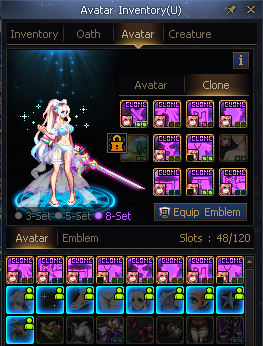
Avatar slots will be separated into the Avatar and Clone Avatar tabs.
Only Normal/Rare Avatars can be equipped in the Avatar tab, and Clone Avatars will be disabled.
Only Clone Avatars can be equipped in the Clone Avatar tab, and Normal Avatars will be disabled.
Appearance/Clone Replacement Rule Changes
Improved the structure so stats are not unequipped when appearances are changed.
- When you replace an appearance Avatar while both an appearance Avatar and a Clone Avatar are equipped, the Clone Avatar will remain equipped.
- When you replace a Clone Avatar, the appearance Avatar will remain equipped.
- The appearance Avatar for that part will be unequipped only when the Clone Avatar is unequipped.
Added Linked Controls Between Tabs
Avatar Inventory
- Right-clicking a Clone Avatar in the Avatar inventory while on the Avatar tab will move you to the Clone Avatar tab.
- Right-clicking a Normal Avatar in the Avatar inventory while on the Clone Avatar tab will move you to the Avatar tab.
Avatar Equipment Slots
- Left-clicking a Clone Avatar in an Avatar Equipment slot while on the Avatar tab will move you to the Clone Avatar tab.
- Left-clicking a Normal Avatar in an Avatar Equipment slot while on the Clone Avatar tab will move you to the Avatar tab.
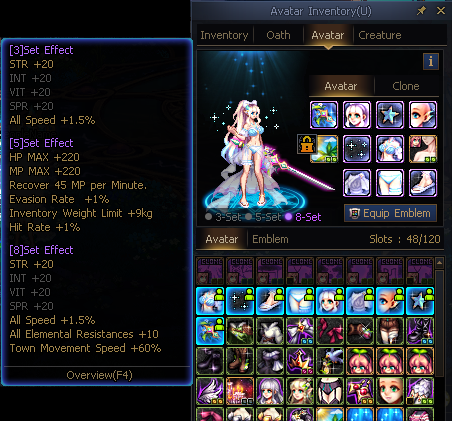
Improved Set Option Display
Set effects that are currently applied will be highlighted separately.
Set effects will be displayed by stage in tooltips.
Colors will be separated by rarity.
(Ex: Common - Green, Rare - Purple)
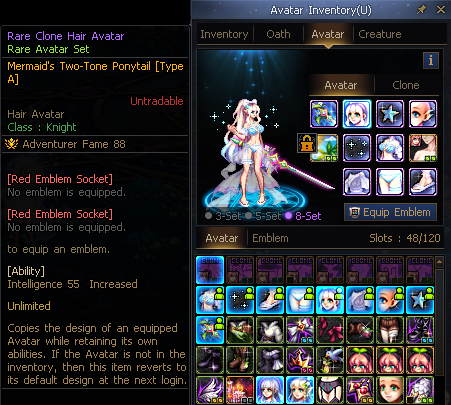
Avatar Tooltip Position Changed
When you place the cursor over an equipped Avatar, the tooltip will be displayed to the left side of the inventory.
(If the inventory is on the left side, the tooltip will be displayed to the right side of it.)
Set Options (F8) can be checked from the tooltip.
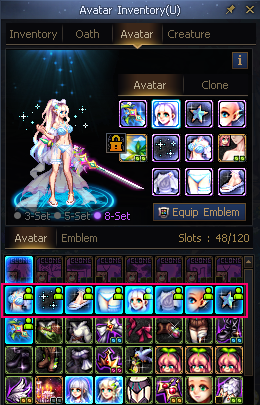
Added Equipped Status Display in Inventory
Added an "Equipped" icon to Avatars currently equipped in the inventory.
Keyboard Control UI/UX Improvements
Improved keyboard controls so they only work on the pop-up that currently has focus when multiple pop-ups are open at the same time.
- When the pop-up with focus is closed, the topmost pop-up will automatically gain focus.
Improved input forms so only search feature controls are available when an input form has focus.
Unified UI display based on controls.
Situation
Details
Image
Keyboard focus and mouse-over overlap
Display both
Keyboard focus and selection overlap
Mouse-over and selection overlap
Display selection only
Keyboard Controls Added and Improved
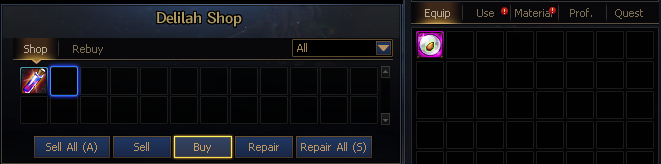
Dungeon Shop Keyboard Controls Added
Added keyboard controls for using shops inside dungeons.
Item
Keyboard Key
Details
Sell
Q
Enable/disable the feature.
Movement Keys
Move keyboard focus.
Tab
Move between tabs in the Inventory.
Spacebar
Sell the selected item.
Shift + Space Bar + Up/Down keys
Change the item quantity in increments of 10.
Shift + Space Bar + Left/Right keys
Change the item quantity to the minimum or maximum value.
Buy
W
Enable/disable the feature.
Movement Keys
Move keyboard focus.
Tab
Move between tabs in the shop.
Spacebar
Buy the selected item.
Shift + Spacebar
Buy multiple of the selected item.
Shift + Up/Down keys
Change the item quantity in increments of 10.
Shift + Left/Right keys
Change the item quantity to the minimum or maximum value.
Repair
E
Enable/disable the feature.
Movement Keys
Move keyboard focus.
Spacebar
Repair the selected equipment.
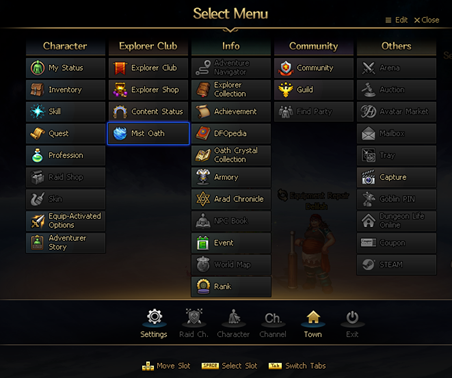
Esc Menu Keyboard Controls Added
Added keyboard controls to the Esc menu.
Keyboard focus will be displayed when you enter the Esc menu using keyboard controls.
Category
Keyboard Key
Details
Note
Move Keyboard Focus
Movement Keys
Move keyboard focus.
Switch Menus
Tab
Switch between the vertical category menu and horizontal system menu.
Slot Input
Spacebar
Select the slot with keyboard focus.
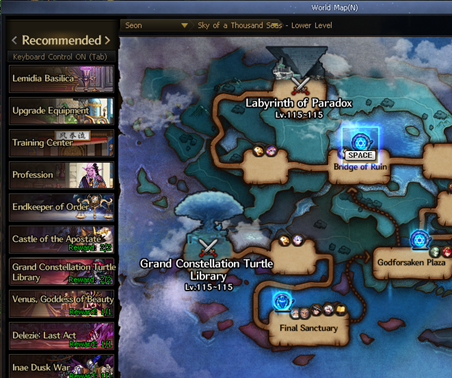
World Map Keyboard Controls Improved
Added keyboard controls to Warp Points.
Category
Keyboard Key
Details
Note
Move Keyboard Focus
Movement Keys
Move keyboard focus.
Switch Areas
Tab
Switch between the Favorites menu and Warp Point area.
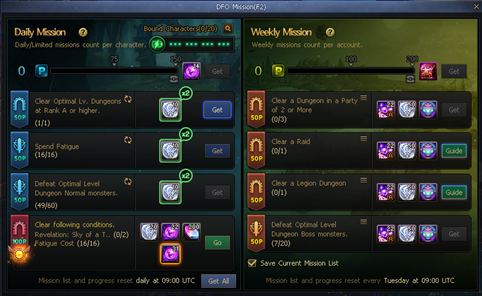
Added keyboard controls to DFO Missions.
Category
Keyboard Key
Details
Note
Move Keyboard Focus
Movement Keys
Move keyboard focus.
Slot Input
Spacebar
Select the slot with keyboard focus.
Sequential Pop-up Window Closing
Selected Window Priority Closing Feature Added
Added a feature that closes windows sequentially from the topmost window when ESC is pressed while multiple pop-up windows are open.
The Close All Windows feature is activated when ESC is held down for at least 0.5 sec.
But selection windows that require confirmation, such as confirm/cancel selection windows and Raid Auction windows, are excluded from Close All.
Pop-up Window Focus Rules Improved
Changed the system so that when a specific window is selected by right-clicking or left-clicking while multiple pop-up windows are open, that window moves to the top and gains focus.
Changed the logic so the focused window closes first when ESC is pressed.
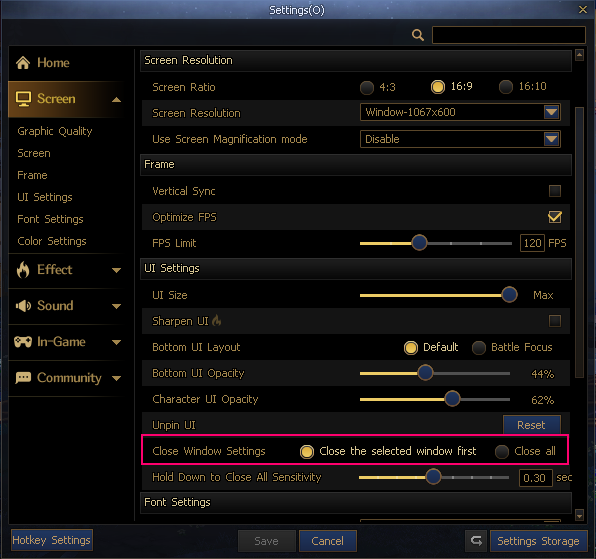
Window Closing Method Selection Option Added
Path: Settings → Game → Window Closing Method
Options
1. Close the selected window first
2. Close all
The default ESC key behavior will change based on your settings.
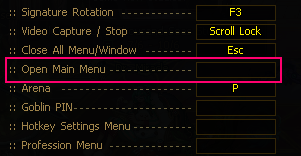
Open Main Menu Hotkey Settings
When a separate hotkey is set for "Open Main Menu" (excluding ESC), the hotkey that is set can open the Main Menu immediately, even if multiple windows are open.
Other Systems
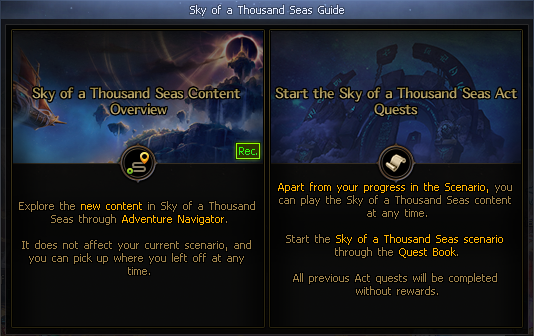
Sky of a Thousand Seas Guide
The Sky of a Thousand Seas guide pop-up will appear when you reach Level 115 or log in for the first time with a Level 115 character.
Explorer Collection
Achievement: Changed some achievements so they can no longer be completed.
Changed the Monster Collection inventory limits for piece possession and refinement.
Category
Before
After
Possession
5,000
9,999
Refinement
99
300
Character Training
Readjusted Training EXP obtained from some content.
Category
Content Name
Legion
Venus, Goddess of Beauty
Advanced Dungeon
Moon-Submerged Lake
The Azure Main
Temple of Death
Unshackled Nightmare
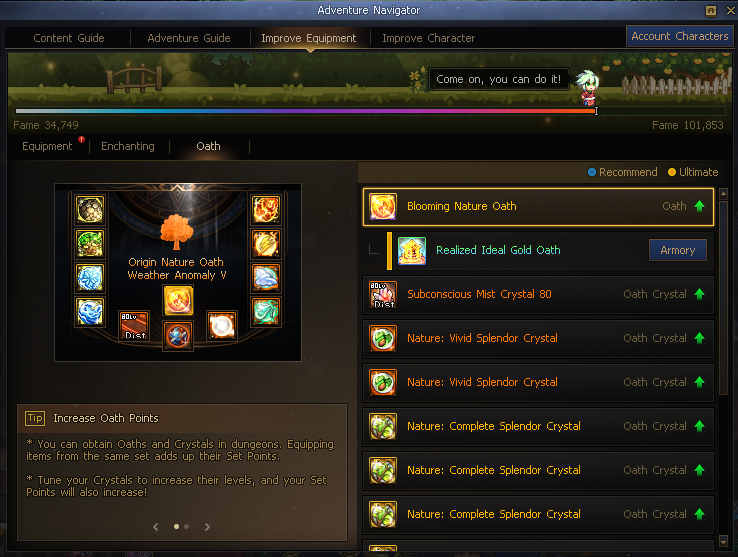
Adventure Navigator
Content Guide
- Changed the World Boss: Contagion category to Special Dungeon.
- Expanded Memories of Triumph to Tier 15.
- Added and removed some slots.
Adventure Navigator
- Adjusted Guide Dungeons.
- Removed Fusion Stones and Insignia/Mist Assimilation from graph achievement conditions.
- Added Oath to graph achievement conditions.
Equipment Enhancement
- Added guidance for new Equipment items.
- Added guidance for new Enchantment items.
- Removed the Fusion Stone and Insignia tabs, and added the Oath tab.
World Map
Adjusted Recommended Favorites based on content changes.
Added and removed World Map slots.
DFO Missions
Changed Daily/Weekly Missions to match the Sky of a Thousand Seas season.
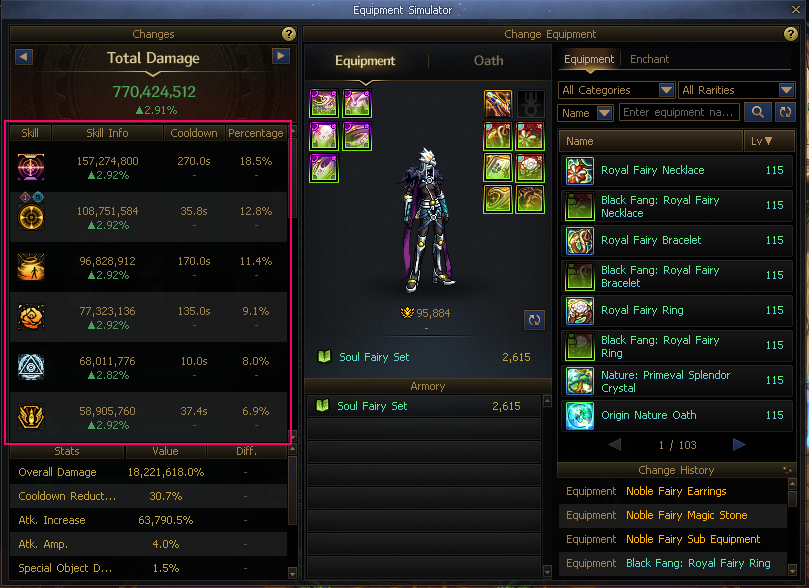
Equipment Simulator
Changed the display method for Special Object Damage.
Category
Before
After
Activation Type
DPS
1 use
Continuous Damage Type
Damage accumulated over 10 sec.
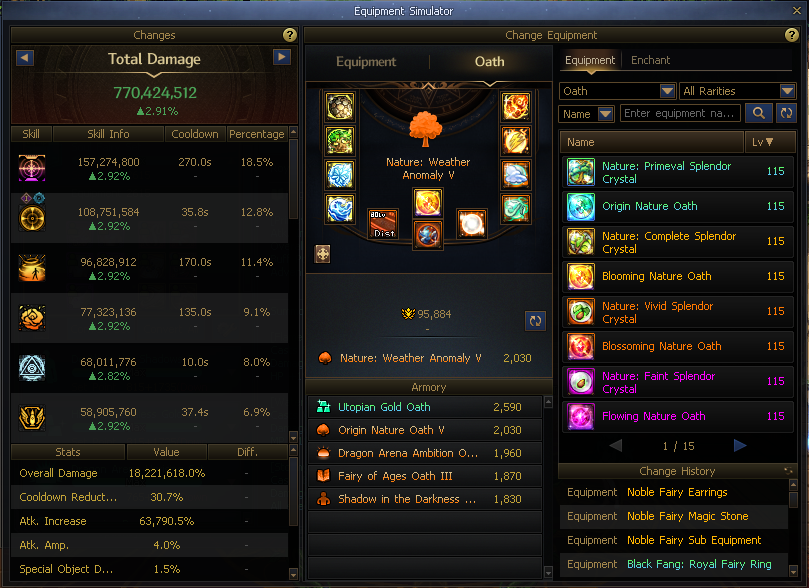
Removed the Fusion Stone tab and added the Oath tab.
Added a feature that lets you load Oath sets registered in the Armory.
- Right-click equipment or Oaths registered in the Armory to load them.
Adjusted the Armory list area.
Changed how Change History is saved and displayed.
- Records the setup from the point when information in the Simulator is changed.
- Right-click to load a saved setup.
Ranking
The Legion - Venus, Goddess of Beauty ranking will end.
Explorer Collection
Changed the Monster Collection inventory limit for piece disassembly.
Category
Before
After
Disassembly
99
300
Adventure Navigator
Content Guide: Improved the guidance text for Daily Dungeon.
Improve Equipment: Displayed the Tuning level on Oath icons.
View Buff Icon Groups
Removed the Normal/Fusion Stone menu and changed it to Equipment/Oath.
Removed the Show Equipment Options feature.
Exit Game Pop-Up
Changed Fusion Stone information in obtained equipment displays to Oath.
Seria’s Greeting Reward Improvements
Seria’s Greeting Benefit Improvements
Seria’s Greeting will be improved.
- Adventurers who were already receiving Seria’s Greeting will have their effects reset and changed to the new Seria’s Greeting effects.
Improved New/Returning missions and Level-up rewards to help with dungeon play.
- Integrated Conversion and Inheritance cost discount benefits will be added.
- The performance of provided Titles and Creatures will be improved.
- An Aura and a Buff Enhancement Title will be additionally provided for 30 days.
- A Unique Weapon Selection Box will be provided each time a certain Level is reached.
- Changed some existing mission details and reward items.
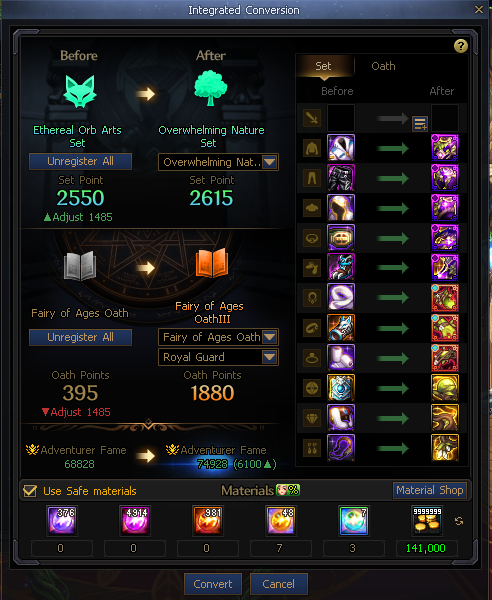
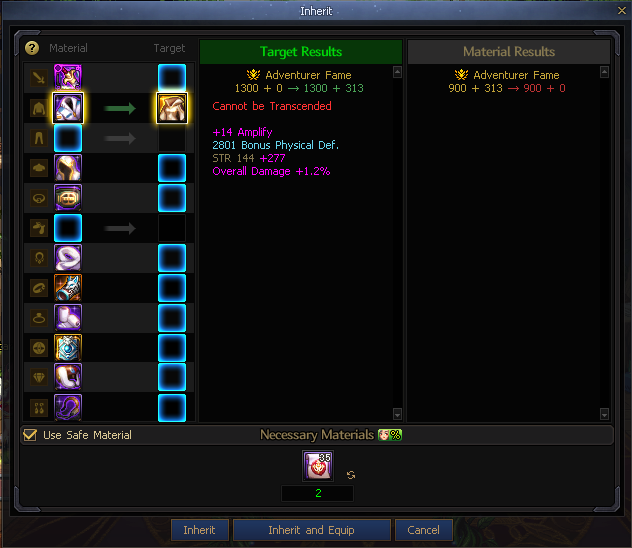
Integrated Conversion and Inheritance Cost Discount
Integrated Conversion and Inheritance costs will be discounted by 70% while Seria’s Greeting benefits are applied.
Integrated Conversion
Inherit
Mission Changes
Normal Mission Changes
New Adventurer
Category
Mission
Existing Reward
New Reward
Trade Type
Existing Mission
Go to New Town, Elvenguard
Remy's Sparkling Touch x100
Special Ari Recovery Potion x40
Account-bound
How to Get Clear Cube Fragments: Disassemble Equipment
Life Token Box (5)
Clear Cube Fragment x500
Use Powerful Skills: Clear Cube Fragment Skills
EXP Capsule 10% (1 - 99)
Clear Cube Fragment x1000
Learn Skills Easily: Auto Skill Allocation
Sprout Ari Hat Avatar Box (Unlimited)
Sprout Ari Hat Avatar Box (Unlimited)
How to Grow Stronger: 1st Awakening
Life Token Box (10)
Welcome Back Contract Package (14 Days)
How to Grow Much Stronger: 2nd Awakening
Seria’s Greeting Lv. 70 Equipment Box
Special Ari Recovery Potion x40
New Mission
How to Grow Much Stronger: Neo: Awakening
-
Special Ari Recovery Potion x50
A Shortcut to Fast Leveling: Quests
-
Sprout Ari's Shout (Permanent Title)
Removed Mission
How to Grow Stronger: Advance to a New Class
Welcome Back Contract Package (14 Days)
-
-
Reach Level 30 Quickly
Farming Support Box (30 Halidom Weapon + Armor Unlimited)
-
-
How to Meet Different Adventurers: Join a Guild
Silver Safe Expansion Pass
-
-
Returning Adventurer
Category
Mission
Existing Reward
New Reward
Trade Type
Existing Mission
Beginning of the Adventure: Visit Town
Life Token Box (10)
Special Ari Recovery Potion x40
Account-bound
How to Get Clear Cube Fragments: Disassemble Equipment
Canna's Delicious Homemade Bread x50
Clear Cube Fragment x300
Use Powerful Skills: Clear Cube Fragment Skills
Improved Growth Potion x1 (Level Limit: 94 - 99)
Clear Cube Fragment x500
How to Grow Much Stronger: 2nd Awakening
Seria’s Greeting Lv. 70 Equipment Box
- Lv. 70 Halidom Weapon/Accessory
Special Ari Recovery Potion x40
How to Grow Much Stronger: Neo: Awakening
Remy's Sparkling Touch x100
Special Ari Recovery Potion x50
A Shortcut to Fast Leveling: Quests
Welcome Back Avatar Box (14 Days, No Socket)
Special Ari Recovery Potion x30
New Mission
How to Grow Stronger: 1st Awakening
-
Welcome Back Contract Package (7 Days)
Learn Skills Easily: Auto Skill Allocation
-
Special Ari Recovery Potion x30
Removed Mission
How to Meet Different Adventurers: Join a Guild
Welcome Back Contract Package (7 Days)
-
-
Increase Your Level Quickly
Seria’s Greeting (30 Days)
-
-
Repeat Mission Changes
Existing Repeat Mission
New Repeat Mission
Category
Mission
Reward
Mission
Reward
New
Daily Training, Dungeon Clear
(Clear 2 Dungeons)
Ari Coin x30
Merchant Guild Silver Coin x5
Train Every Day
(Clear 2 Dungeons)
Ari Coins x200
Return
How to Acclimate: Dungeon Clear
(Clear 2 Dungeons)
Ari Coin x25
Merchant Guild Silver Coin x5
Train Every Day
(Clear 2 Dungeons)
Ari Coins x160
Guide Mission Changes
Increased the performance of Magic Beads provided through Guide Missions.
Changed some items from box-type rewards to immediate acquisition.
Category
Mission
Existing Reward
New Reward
Trade Type
Reward Change
Enchantment Guide I Quest
Ari Necklace/Bracelet/Ring Bead Selection Box
Ari's Accessory Magic Bead Selection Box
Account-bound
Adventurer Fame Guide I Quest
Lv. 110 Epic Fusion Stone Selection Box
Merchant Guild Silver Coin x10
Weapon Attribute Guide I Quest
Ari Weapon Bead Selection Box
Ari's Weapon Magic Bead Selection Box
Guild Guide I Quest
Small Guild Coin Box x1
Large Guild Coin Pouch x1
Same as Before
Equipment Reinforcement Guide I Quest
Single-Use Reinforcer x5
Single-Use Reinforcer x5
Equipment Amplification Guide I Quest
Single-Use Amplifier x2
Single-Use Amplifier x2
Equipment Refinement Guide I Quest
Single-Use Weapon Refiner x5
Single-Use Weapon Refiner x5
Creature Guide I Quest
Creature Food x150
Creature Food x150
DFOpedia Guide I Quest
Merchant Guild Silver Coin Box (10)
Merchant Guild Silver Coin x10
Buff Enhancement Guide I Quest
Merchant Guild Silver Coin Box (10)
Merchant Guild Silver Coin x10
Avatar Guide I Quest
Welcome Back Contract Package (7 Days)
Welcome Back Contract Package (7 Days)
Level-Up Mission Reward Changes
Titles/Creatures/Auras and Buff Enhancement Titles that help with dungeon play will be provided for 30 days.
Each Level Achievement reward is awarded in box form.
Ari's Buffer Sub Equipment Bead (STR/INT/VIT/SPR +100)
Ari's Buffer Magic Stone Bead (STR/INT/VIT/SPR +100)
Ari's Buffer Earrings Bead (STR/INT/VIT/SPR +175)
Seria’s Greeting - Other Changes
Changed the Seria’s Greeting HUD so it cannot be used inside dungeons.
Independent Atk. System Renewal
Independent Atk. Calculation Formula Renewal
Increased the Independent Atk. of Lv. 115 Normal weapons.
Increased the Independent Atk. of Lv. 115 Legacy weapons to the same value as Physical/Magical Atk.
Example)
Type
Independent Atk.
Before
After
Primeval Normal Weapon
970
1,610
Primeval Legacy Weapon
970
1,757
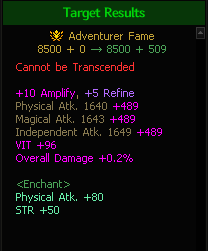
Moved the Independent Atk. value that characters had to weapons.
- The Independent Atk. value after reaching Refinement Lv. 8 will be slightly increased compared to now.
When equipment below Lv. 115 is equipped, the Independent Atk. value that existing characters had will be adjusted as a buff effect.
Increased the Independent Atk. value gained through Refinement.
Example)
Independent Atk.
Primeval Normal Weapon
Primeval Legacy Weapon
Refinement Lv.
Before
After
Before
After
+1
47
67
47
68
+2
70
93
70
94
+3
94
150
94
151
+4
140
212
140
214
+5
187
285
187
288
+6
304
485
304
489
+7
421
698
421
704
+8
585
1,092
585
1,102
Buffer-only Option: Adjusted the stat increase applied through Refinement.
Example)
All Stats
Primeval Normal Weapon
Primeval Legacy Weapon
Refinement Lv.
Before
After
Before
After
+1
5
4
5
4
+2
7
5
7
5
+3
9
8
9
8
+4
14
12
14
12
+5
19
16
19
16
+6
30
27
30
27
+7
42
38
42
39
+8
58
60
58
61
Independent Atk. Increase During Reinforcement/Amplification
Changed weapon Reinforcement/Amplification so Independent Atk. increases.
Example)
Independent Atk.
Normal Weapon
Legacy Weapon
Reinforcement
Amplification Lv.
+1
51
52
+2
67
68
+3
93
94
+4
121
123
+5
150
151
+6
179
180
+7
212
214
+8
285
288
+9
378
382
+10
485
489
+11
698
704
+12
952
961
+13
1,115
1,126
Changed the system so characters that use Independent Atk. also gain Fame when reinforcing weapons.
Only the higher Independent Atk. and Fame bonus values between weapon Reinforcement/Amplification and Refinement will apply.
Additional Improvements
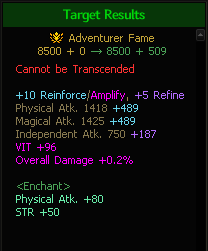
Changed the Inheritance window display method as follows.
Before
After
The warning system message that appeared during Reinforcement for Independent Atk. characters will no longer appear.
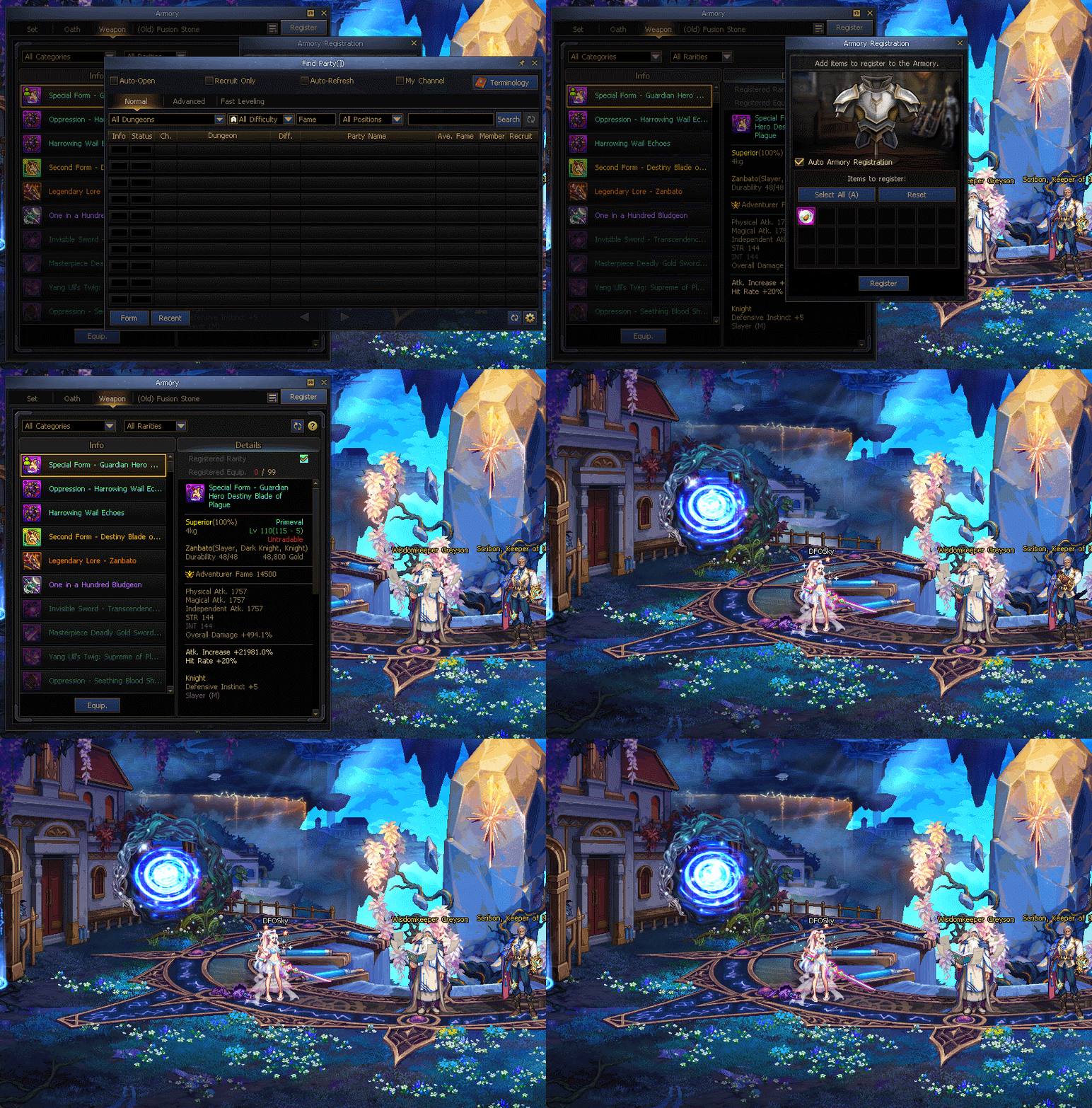
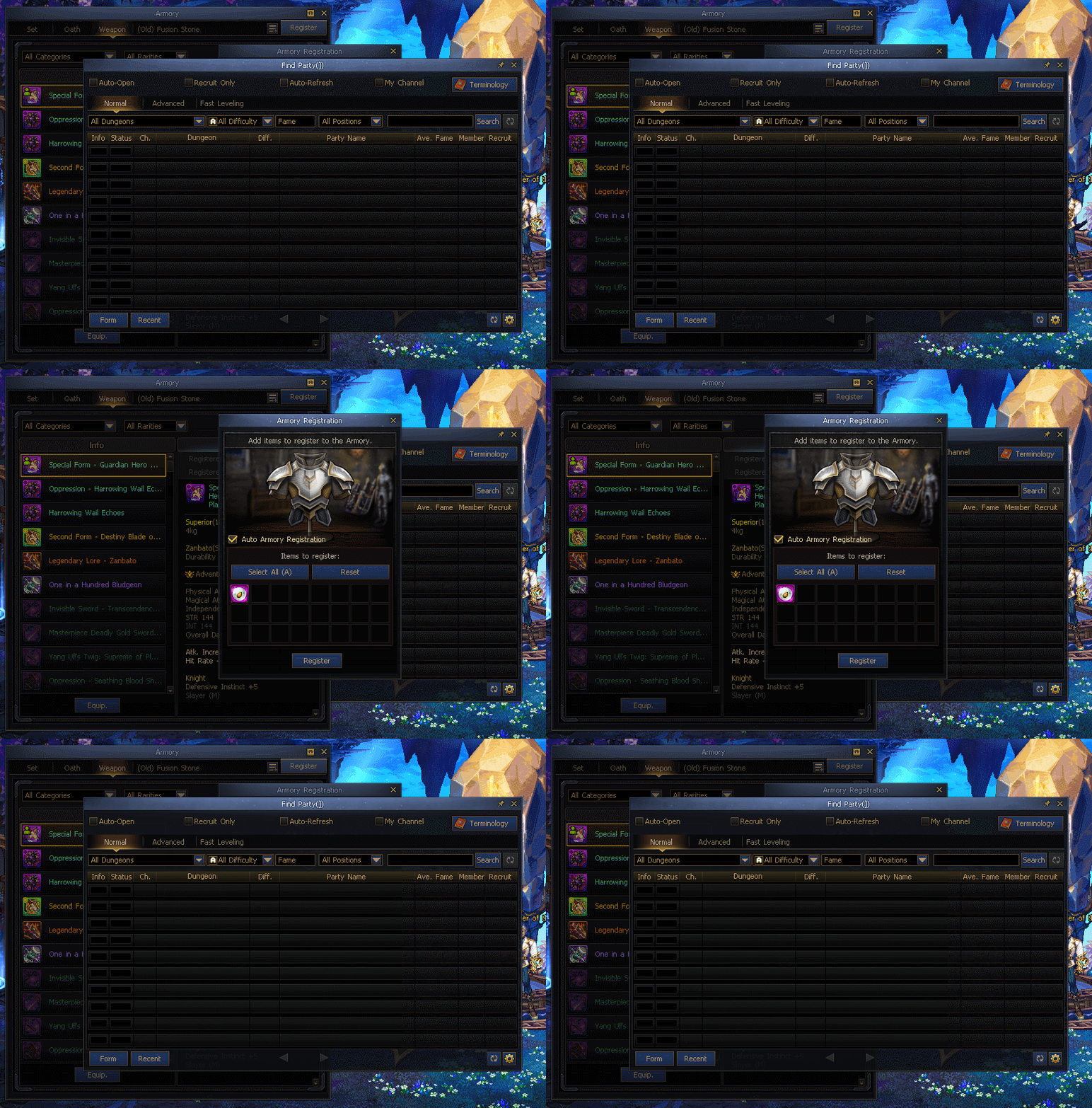
Auto Armory Registration
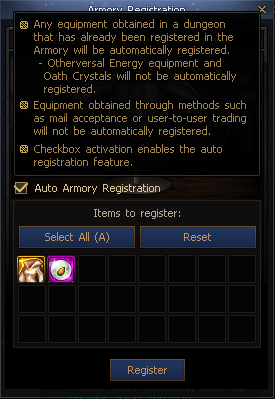
Added the Auto Armory Registration system.
- Among equipment obtained from dungeons or card rewards, equipment that has already been registered in the Armory will now be registered automatically.
* Otherversal Energy equipment and Oath Crystals will not be automatically registered.
* Items that appear upon disassembly are the same as those that appear during manual Armory registration.
- You can turn this setting On/Off in the Armory Registration UI.
* Settings are saved by character, and the default setting is Off.
The following equipment are eligible for Auto Registration.
 Edge
Click the "View Site Information" icon on the left side of the address bar,
Edge
Click the "View Site Information" icon on the left side of the address bar, Firefox
Select "Allow" in the notification window that appears
Firefox
Select "Allow" in the notification window that appears Other browsers
Allow blocked notifications in your browser’s settings.
Other browsers
Allow blocked notifications in your browser’s settings.
.jpg)
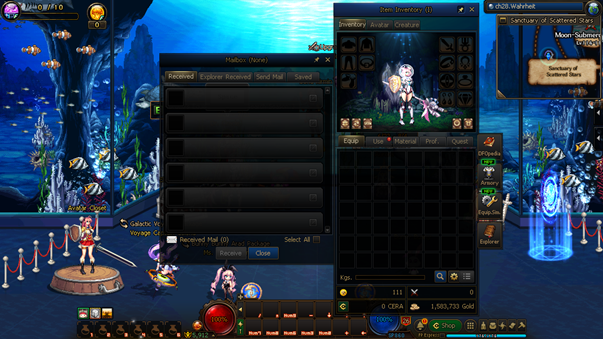
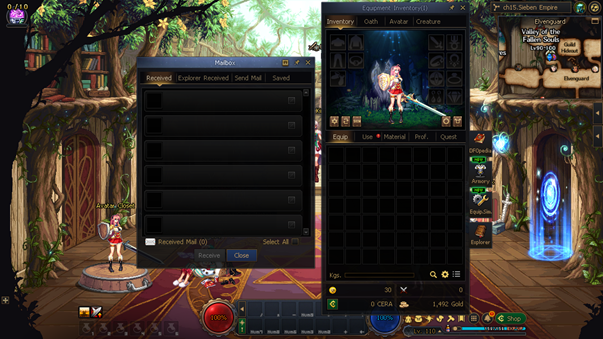

 Enhanced Sprout Ari's Shout (30 Days)
 Enhanced Seria’s Greeting (30 Days)
 Seria's Gift (Buff Enhancement) (30 Days)
 Seria and Ari's Blessing Aura (30 Days)
 Doom Oracle Box (50)
 Special Ari Cry Potion
 Delilah’s Repair Coupon (1 Part)
 Ari Fatigue Healing Elixir (30)
 Ari's Weapon Magic Bead Selection Box
 Ari's Armor Magic Bead Selection Box
 Ari's Accessory Magic Bead Selection Box
 Ari's Special Equipment Magic Bead Selection Box
 Single-Use Equipment Reinforcer/Weapon Refiner Selection Box
 Large Guild Coin Pouch
 Special Ari Recovery Potion
 (Lv. 1 – 94) Level Up Ticket
 (Lv. 1 – 99) Level Up Ticket
 Sub Equipment Quest Clearance Ticket
 Magic Stone Quest Clearance Ticket
 Earring Quest Clearance Ticket
 Energy Core Box (300)
 Superconductor Energy Core Box (4)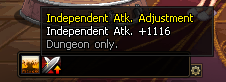


.jpg)
.jpg)
.jpg)
.jpg)
.jpg)
.jpg)
.jpg)
.jpg)
.jpg)
.jpg)
.jpg)
.jpg)
.jpg)
.jpg)
.jpg)
.jpg)
.jpg)
.jpg)
.jpg)
.jpg)
.jpg)
.jpg)
.jpg)
.jpg)
.jpg)
.jpg)
.jpg)
.jpg)

.jpg)
.jpg)
.jpg)
.jpg)
.jpg)

.jpg)


.jpg)

.jpg)


.jpg)


.jpg)